
Claude Code builds in your Figma

Figma-CLI is the bridge. Say what you want in plain English and Claude builds it on your canvas: real frames, real components, real variables, always editable.

Paste into Claude CodeDownload the figma-cli project from https://github.com/silships/figma-cli into a folder in my home directory, then go into it.

No API key, no cloud, no rate limits.

Runs inside the agent you already use

Claude Code
Cursor
Figma Desktop
LM Studio
Ollama
How it works

You talk to Claude Code, Figma updates

No commands, no code. You say it the way you would say it to a colleague, and it appears on the canvas.

Your Figma canvas
primary#F54E00
primary-active#D04200
ink#26251E
body#5A5852
muted#807D72
canvas#FFFFFF

6 real Figma variables, not hex codes pasted into fills

Design systems

Build your design system with Claude Code

Ask Claude for a component and you get a real component set with variants, bound to real variable collections. 40+ shadcn/ui components and 200+ variables in one prompt.

Turn this into a reusable component with Small, Medium and Large variants One component set, bound to your variables

Import from a DESIGN.md, your tailwind config, a tokens.json or Storybook. Export any Figma file back to markdown.

Design system
Variables · Light and Dark
Type scale
Heading Body Caption
Components · 40+ available
Button Secondary Badge Email address
Motion

Animate it on Figma's own timeline

Describe the movement to Claude and it writes native Figma Motion: real keyframes on the timeline, staggered and editable.

Animate the rings so they wind into place, staggered, with a springy bounce A 1.5 second timeline, each ring offset by 0.18 seconds
Structure

Verify your design system

Claude is great at building, not at proving. So this half runs without a model: a snapshot of your file becomes a contract and check verifies it, exit 1 on any violation.

Terminal
$ figma-cli snapshot     # design.json, the contract
$ figma-cli rules gen    # one YAML per component
$ figma-cli check        # exit 1 on any violation

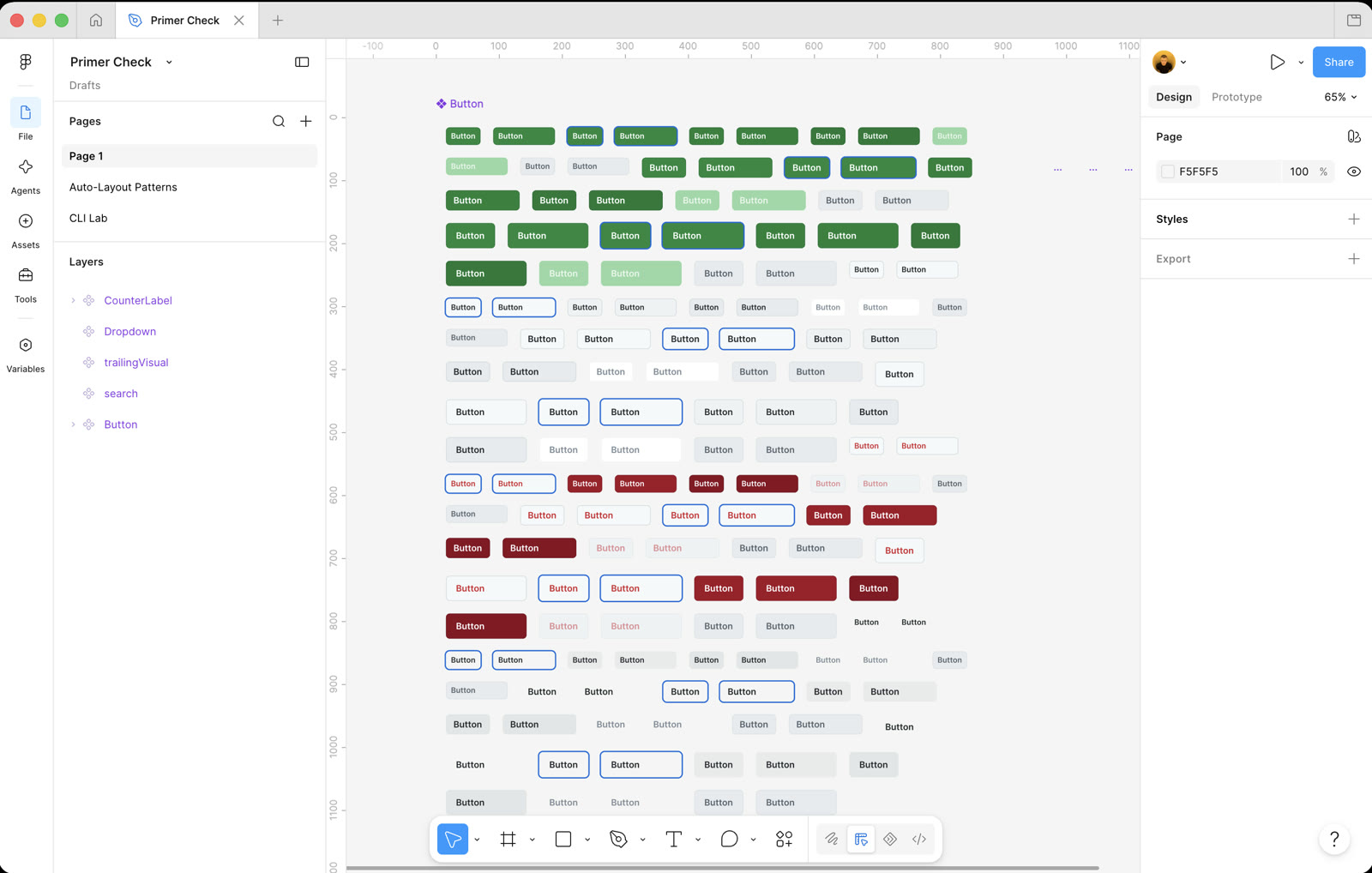
Catches drift, missing variants, unbound fills, height regressions. Verified against GitHub's Primer: a 144-variant Button, all 576 fills.

GitHub's Primer Button component set open in Figma, hundreds of variants in green, blue, grey and red laid out in a grid
Local models

No Claude? Runs on local models too

Same setup with Cursor, or fully offline with LM Studio and Ollama. Nothing leaves your machine.

Load all shadcn variables, then create 5 button components 244 primitives, 32 semantic tokens, 5 components, all from a model on the laptop
  1. 01

    Open the Terminal

    Mac: Cmd + Space, type Terminal, Enter. Windows: open PowerShell.

  2. 02

    Start Claude Code

    Type this one word and hit Enter.

    Terminal
    $claude
  3. 03

    Paste the first prompt

    Claude downloads the project into your home directory and moves into the folder.

    Claude Code
    Download the figma-cli project from https://github.com/silships/figma-cli into a folder in my home directory, then go into it.

    Rather do it yourself? Grab the ZIP from GitHub and start Claude Code in that folder.

  4. 04

    Paste the second prompt

    Claude reads the project instructions, installs what is needed and connects to your open Figma Desktop.

    Claude Code
    Set up figma-cli and connect it to my Figma.

    In Cursor it is one line instead of two: “Install github.com/silships/figma-cli and connect it to my Figma.”

  5. 05

    Pick how it connects

    Claude picks one during setup. All three do exactly the same things, you can switch anytime.

    Yolo default

    A small, reversible patch to the Figma Desktop app. Nothing to keep open, Claude can un-patch it anytime.

    Browser app untouched

    Runs Figma in its own Chromium profile, same speed, the desktop app is never modified.

    Safe plugin route

    Run the built-in plugin from Plugins → Development → FigCli and keep it open.

  6. 06

    Run your first prompt

    Setup is done. Open a Figma Desktop file, type this and watch the canvas.

    Claude Code
    Create three pricing cards in a row

    Three frames appear, real auto-layout, fully editable.

Comparison

Figma-CLI vs a Figma MCP server

Both let an AI agent work with Figma. The difference is where they connect: the MCP servers go through Figma's cloud REST API, Figma-CLI drives the Figma Desktop app on your machine.

 Figma-CLIFigma official MCP / figma-console-mcp
How it connectsCDP to your local Figma DesktopFigma REST API in the cloud
Figma API tokenNot neededRequired
Rate limitNone, there are no API calls to throttleYes, as low as 6 read calls a month on a View seat
Works offlineYes, including local modelsNo
Cold start to first componentAbout 140 tokensAbout 1,600 tokens
SetupOne connect commandToken plus plugin or bridge

Rate limits per Figma's own MCP documentation. Token counts measured in one like-for-like session, approximated as bytes divided by four.

FAQ

Questions people ask

What is Figma-CLI?

Figma-CLI is a free, open-source command line tool that lets an AI coding agent such as Claude Code or Cursor build directly in the Figma Desktop app. You describe what you want in plain English, the agent runs the commands, and real editable frames, components and variables appear on your canvas.

Does Figma-CLI need a Figma API token?

No. It talks to the Figma Desktop app on your machine over CDP instead of calling the Figma REST API. There is no token to create, nothing is sent to a cloud service, and there are no API rate limits to hit.

Does Figma-CLI work with Cursor?

Yes. The CLI drives Figma Desktop, not your editor, so nothing about it is Claude-only. In Cursor the setup is a single line, and one command writes the Cursor rules plus an AGENTS.md that both Cursor and Claude Code read.

Can it run offline or with a local model?

Yes. Figma-CLI works with local LLMs through LM Studio or Ollama, fully offline. No API key, no cloud round trip, nothing leaves your machine.

Does it modify the Figma app?

Only in Yolo mode, which applies a small reversible patch that Claude can undo at any time. Browser mode runs Figma in its own Chromium profile at the same speed without touching the desktop app, and Safe mode uses a built-in plugin instead.

Is it an official Figma product?

No. Figma-CLI is an independent open-source project under the MIT license, built by Sil Bormüller of Into Design Systems. It is not affiliated with, endorsed by or a product of Figma, Inc.

Portrait of Sil Bormüller, founder of Into Design Systems
Built by Sil Bormüller
Founder at Into Design Systems
Why I built this

I wanted to build in Figma and manage my design system straight from Claude Code, without leaving the agent I already work in.

The other routes go through Figma's cloud REST API, so they need a token and they hit rate limits: as low as 6 read calls a month on a View seat. This talks to Figma Desktop directly, so there is nothing to throttle.

It is also far cheaper in tokens, because no tool schemas are loaded into context. Measured in one session: cold start to the first component was about 140 tokens against roughly 1,600 through an API-based MCP.

Questions? Send me a DM on LinkedIn Want a new feature? Open a PR on GitHub

Build your next Figma file from Claude Code

Free and open source under the MIT license.