
Tutorial: How to test a Figma design system with Claude Code

By Sil Bormüller. Published 2026-08-08. Step-by-step tutorial: snapshot your Figma design system as design.json, generate a contract per component and let Claude Code run an automated check. Catches drift, broken token bindings, missing variants and geometry regressions in seconds. Free and open source with figma-cli, tested on GitHub's Primer.

Tags: Figma, Claude Code, Design Systems, AI, Testing, figma-cli, Designer.

Reading time: 9 min read.

Article Content

**To test a Figma design system, export it as a machine-readable snapshot, generate one contract per component describing what must be true, then run an automated check against the live file. Claude Code can do all three in plain language with figma-cli. The check names the component, the property and both numbers in seconds.**

Screenshots and review meetings do not scale. This does.

---

Why you cannot review a design system by looking at it

Every design system has the same blind spot. You can see what a component looks like. You cannot see whether it is still correct.

Someone renames a variant. Someone pastes a hex value over a colour token because the picker was two clicks away. A hover state disappears during a cleanup. None of it raises a flag. The file opens, the component renders, it just quietly stops being the thing you agreed on.

The usual defences are library review meetings, screenshot comparisons and one senior designer who knows the system well enough to notice. That holds until you have 40 components and four people touching them. Nobody looks at 144 button variants every week and means it.

AI makes the gap wider. When an assistant builds a component from a description of your system, the honest way you verify today is that you look at it. That is a review, not a verification. Worse, the AI is usually the thing telling you it worked. Something that generates work should not also certify it.

Engineering solved a version of this decades ago, and the solution is unglamorous: write down what is supposed to be true, then let a program check it. Nobody debugs a codebase by scrolling through it hoping to spot something. They run the tests.

Taste is not testable. Everything underneath it is: is the variant matrix complete, are colours actually bound to tokens, is the hover state still wired, did the button get 24 pixels taller. Those are facts, and facts can be checked by a machine.

---

What you need

| Requirement | Why | |---|---| | Figma Desktop | figma-cli talks to the app on your machine, not the cloud API | | Claude Code or Cursor | Drives the CLI in plain language | | [figma-cli](https://github.com/silships/figma-cli) | Free, open source, does the snapshot, contracts and check | | A design system file | Any file with component sets and variables works |

No API key, no plugin left running, no cloud roundtrip. It works offline.

---

Step 1: Connect Claude Code to your Figma file

Open Claude Code or Cursor in any folder and say:

``` Install github.com/silships/figma-cli and connect it to my Figma. ```

Then open your design system file in Figma Desktop. If you have done our [Claude Code and Figma setup](/blog/claude-code-figma-no-mcp) before, this is the same connection, no MCP required.

---

Step 2: Snapshot your system as design.json

Ask for a snapshot. Your design system gets written out as one file, `design.json`, that captures the current state exactly: every component, every variant, every token, every mode. It lives next to your code and gets versioned like anything else.

The important part is that it is built to be **comparable**. Everything that changes for no reason is stripped out:

- Internal ids, publish keys and timestamps are removed - Lists with no meaningful order get sorted - Numbers get rounded

Export the same system twice and you get two identical files. So any difference you ever see is a real change, never noise. That single property is what makes the rest trustworthy.

DESIGN.md and design.json do different jobs

If you have used figma-cli you already know `DESIGN.md`: your whole system written out as markdown, colours ranked by usage, the type scale, spacing, radii, the full variant matrix, every variable with its modes and aliases. Claude, Cursor and Copilot read it and build UI that matches your Figma file instead of guessing.

DESIGN.md is prose, and prose is right for building because a model has to interpret it. That same quality makes it useless for verifying: the only way to answer "is this still correct?" from a page of markdown is a human reading it, which puts you back in the review meeting.

| | DESIGN.md | design.json | |---|---|---| | Written for | An AI to read and interpret | A program to compare | | Format | Prose markdown | Normalised, deterministic | | Answers | What does my system look like | Is my system still correct | | Used when | Building UI with an agent | Checking before publish, on migration, in CI | | AI involved | Yes, it is the reader | No, none at all |

---

Step 3: Generate a contract per component

Ask for contracts. For each component you get a short, readable file stating what it promises:

> Button has four variants across two sizes and six states. Every fill is bound to a token. The medium size is 40 pixels tall, give or take two. Hovering goes to the hover state.

These are written by the tool reading your actual Figma file, not by a model and not by you from memory. Nobody sits down and authors 40 specifications. You read them once, decide that is what you meant, and from then on they are the reference.

The generator also refuses to promise more than it can keep, which took a while to get right:

- If your token migration is half done, the contract records how many fills are bound **today** and fails when that number drops, instead of demanding you finish a migration you have not started - If something could only be measured on one variant instead of all of them, the file says so in writing

A green check that quietly means less than it looks like is worse than no check.

---

Step 4: Run the check

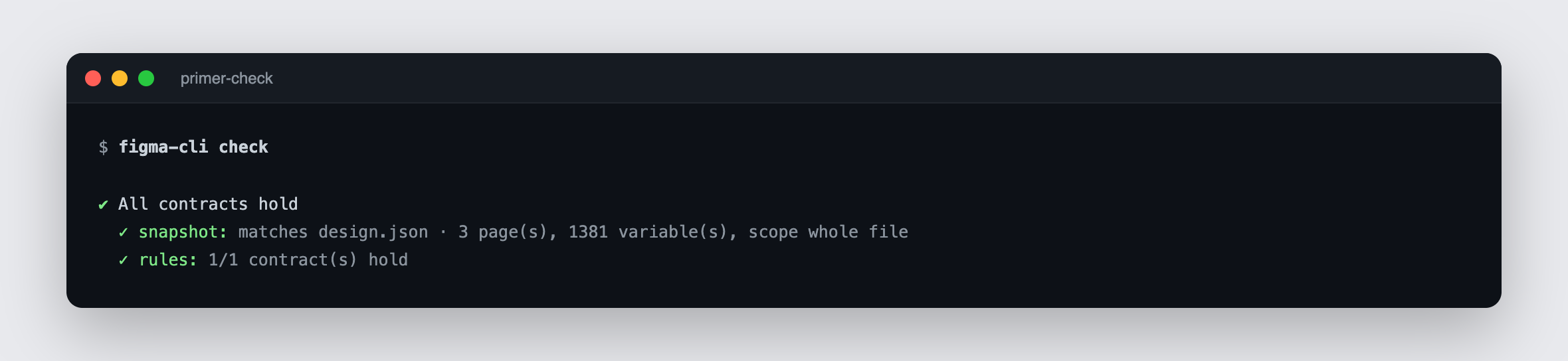
Ask for a check and you get an answer in seconds: everything holds, or precisely what does not.
![figma-cli check result in the terminal showing all component contracts holding for the Primer design system](/blog/img/figma-cli-contracts-hold.png)

---

Step 5: Read the report

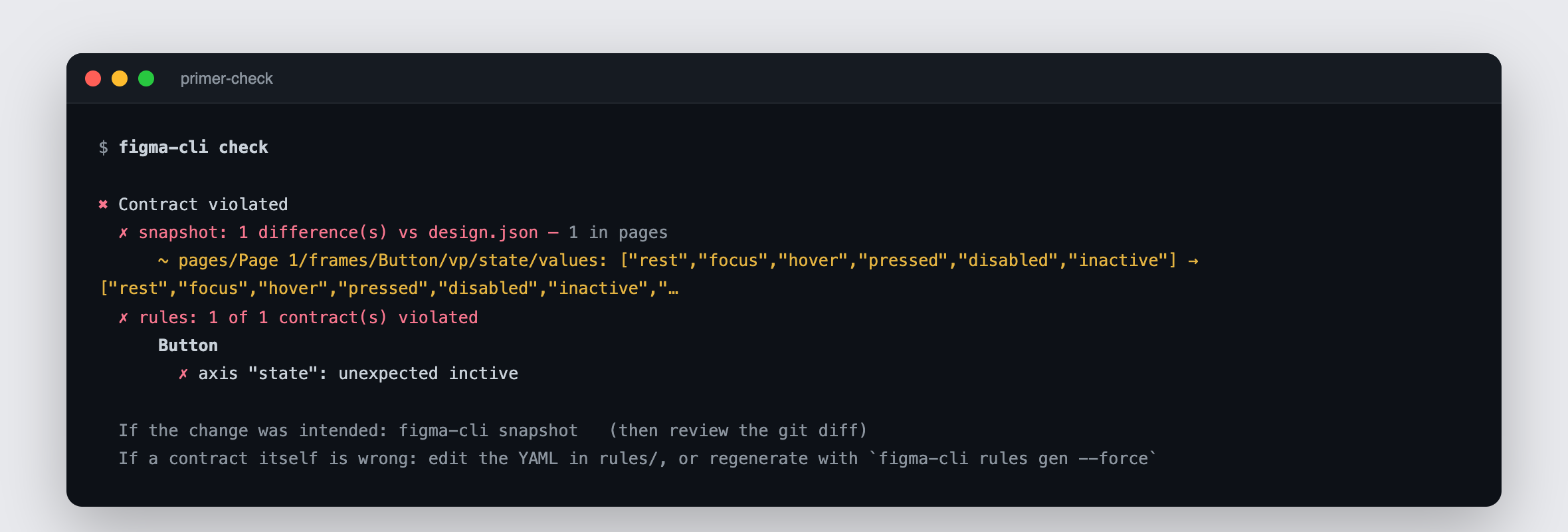
Now the interesting case. One variant renamed from `inactive` to `inctive`, one missing character in one of 144 names:

![figma-cli drift report naming the component, the property and both values after one variant was renamed from inactive to inctive](/blog/img/figma-cli-variant-renamed-drift.png)

Not "something looks off" but the component, the property and both numbers. The small button used to be 32 pixels tall and is now 56. The state axis gained a value called `inctive`.

A warning you cannot act on is noise. A line like that is a task.

What the check catches

| Check | What it proves | |---|---| | Drift | Anything that changed since you last agreed on the state, with the exact component and numbers | | Variant matrix | Every combination present, no axis value that appeared without a decision | | Token binding | Every fill and stroke bound to a variable, measured across all variants, not one spot check | | Geometry | Heights within a stated tolerance, so a size regression is caught by number instead of by eye | | Interaction | Prototype transitions still wired, verified rather than assumed | | Token migration | Proof that every token survived a move between files with its modes and aliases |

That last one is the failure that makes everything come back white and costs you a day to trace.

---

Step 6: Let it run without you

The check can run on its own, nightly or on every change, so you get told when something drifted instead of discovering it in a screenshot two weeks later. That is where most teams should end up.

---

Tested against GitHub's Primer

I ran this against [Primer](https://primer.style/), which is about as real as design systems get.

| | | |---|---| | Nodes | 1,015 | | Variables | 1,381 | | Button variants | 144 | | Fills checked | 576, all bound | | Strokes checked | 144, all bound | | Typo detection | Under one second |

Running the check twice in a row gives an identical result. That is the boring property the whole thing rests on. Then renaming a single variant to `inctive` was caught immediately, with the component and the value named in the report.

That is the kind of typo a review meeting is not built to catch.

---

Four moments to run the check

**Before you publish a library update.** You have been in the file for two days. The check lists everything that changed, including the three things you changed by accident while dragging something else. This is the one I use most.

**When you hand the system to someone else.** A new team member, an agency, a contractor. Instead of a brief they cannot fully absorb, they get contracts saying what each component must satisfy plus a way to check their own work before showing it to you. "Did I do this right" stops being a question they have to ask you.

**When you migrate tokens.** Moving a token library between files is the operation everyone dreads, because when it goes wrong it goes wrong silently. The check proves every token survived before you find out the hard way.

**When an AI builds for you.** Claude builds the component, then the check runs. If a contract is violated it fixes it and checks again. It only reports back when a program with no AI in it agrees the work is done. The AI stops grading its own homework, which is the whole point of [agentic design systems](/blog/agentic-design-systems-self-healing-loop).

---

Why a CLI and not an MCP server

People keep asking how figma-cli differs from Figma's official MCP server and from figma-console-mcp. Those talk to Figma through the cloud over the public API. figma-cli talks to the Figma app on your own computer, the same way a browser talks to a page it has open. That one choice decides everything below.

| | Figma MCP server | figma-cli | |---|---|---| | Connection | Cloud, public API | Local Figma desktop app | | Rate limits | 6 file reads per month on View or Collab, 200 per day on Dev or Full, 600 per day on Organization | None, no API call is made | | Setup | API key, config, plugin running | None, uses your open app | | Offline | No | Yes | | Cold start to first component | ~1,600 tokens | ~140 tokens | | One token-bound component | 256 to 556 tokens | ~68 tokens |

Those token numbers come from one hands-on session, not a lab benchmark, but the order of magnitude is the point. An AI reads constantly, so a single "build this and match my tokens" can burn a dozen API calls before anything lands on the canvas.

There is a second effect that matters more than cost. Every verbose answer sits in the assistant's context and piles up. When the window fills, it compacts and detail gets summarised away: which node was which, what was already tried. Then it recalls things confidently and wrongly, which is more dangerous than gibberish because it sounds right. A tool that costs ten times more per operation gets you there ten times sooner.

---

What stays human

All of it, at the point where it counts.

The check does not know whether your button should be 40 pixels tall. It knows what you agreed and tells you when reality stopped matching. Deciding what the system should be, whether a change is an improvement or a mistake, whether the blue is the right blue: that is design work and it stays design work.

What goes away is the part that was never design work in the first place: squinting at a file, hoping to notice.

Red also does not mean wrong. It means changed. If the change was intended, you take a new snapshot and the new state lands in your version history as a reviewable diff, the same way code changes do.

---

Try it on your own system

figma-cli is free and open source. Open Claude Code or Cursor in any folder and say:

``` Install github.com/silships/figma-cli and connect it to my Figma. ```

Then open your design system file and ask it to snapshot the system, generate the contracts and run a check.

The first check on a system nobody has ever tested usually finds something.

Repo and setup guide: [github.com/silships/figma-cli](https://github.com/silships/figma-cli)

Full article at https://www.intodesignsystems.com/blog/how-to-test-figma-design-system-claude-code. More guides on building with AI agents as a designer at intodesignsystems.com/blog.

Tutorial: How to test a Figma design system with Claude Code

Sil Bormülleron August 8, 20269 min read

To test a Figma design system, export it as a machine-readable snapshot, generate one contract per component describing what must be true, then run an automated check against the live file. Claude Code can do all three in plain language with figma-cli. The check names the component, the property and both numbers in seconds.

Screenshots and review meetings do not scale. This does.


Why you cannot review a design system by looking at it

Every design system has the same blind spot. You can see what a component looks like. You cannot see whether it is still correct.

Someone renames a variant. Someone pastes a hex value over a colour token because the picker was two clicks away. A hover state disappears during a cleanup. None of it raises a flag. The file opens, the component renders, it just quietly stops being the thing you agreed on.

The usual defences are library review meetings, screenshot comparisons and one senior designer who knows the system well enough to notice. That holds until you have 40 components and four people touching them. Nobody looks at 144 button variants every week and means it.

AI makes the gap wider. When an assistant builds a component from a description of your system, the honest way you verify today is that you look at it. That is a review, not a verification. Worse, the AI is usually the thing telling you it worked. Something that generates work should not also certify it.

Engineering solved a version of this decades ago, and the solution is unglamorous: write down what is supposed to be true, then let a program check it. Nobody debugs a codebase by scrolling through it hoping to spot something. They run the tests.

Taste is not testable. Everything underneath it is: is the variant matrix complete, are colours actually bound to tokens, is the hover state still wired, did the button get 24 pixels taller. Those are facts, and facts can be checked by a machine.


What you need

RequirementWhy
Figma Desktopfigma-cli talks to the app on your machine, not the cloud API
Claude Code or CursorDrives the CLI in plain language
figma-cliFree, open source, does the snapshot, contracts and check
A design system fileAny file with component sets and variables works

No API key, no plugin left running, no cloud roundtrip. It works offline.


Step 1: Connect Claude Code to your Figma file

Open Claude Code or Cursor in any folder and say:

Install github.com/silships/figma-cli and connect it to my Figma.

Then open your design system file in Figma Desktop. If you have done our Claude Code and Figma setup before, this is the same connection, no MCP required.


Step 2: Snapshot your system as design.json

Ask for a snapshot. Your design system gets written out as one file, design.json, that captures the current state exactly: every component, every variant, every token, every mode. It lives next to your code and gets versioned like anything else.

The important part is that it is built to be comparable. Everything that changes for no reason is stripped out:

  • Internal ids, publish keys and timestamps are removed
  • Lists with no meaningful order get sorted
  • Numbers get rounded

Export the same system twice and you get two identical files. So any difference you ever see is a real change, never noise. That single property is what makes the rest trustworthy.

DESIGN.md and design.json do different jobs

If you have used figma-cli you already know DESIGN.md: your whole system written out as markdown, colours ranked by usage, the type scale, spacing, radii, the full variant matrix, every variable with its modes and aliases. Claude, Cursor and Copilot read it and build UI that matches your Figma file instead of guessing.

DESIGN.md is prose, and prose is right for building because a model has to interpret it. That same quality makes it useless for verifying: the only way to answer "is this still correct?" from a page of markdown is a human reading it, which puts you back in the review meeting.

DESIGN.mddesign.json
Written forAn AI to read and interpretA program to compare
FormatProse markdownNormalised, deterministic
AnswersWhat does my system look likeIs my system still correct
Used whenBuilding UI with an agentChecking before publish, on migration, in CI
AI involvedYes, it is the readerNo, none at all

Step 3: Generate a contract per component

Ask for contracts. For each component you get a short, readable file stating what it promises:

Button has four variants across two sizes and six states. Every fill is bound to a token. The medium size is 40 pixels tall, give or take two. Hovering goes to the hover state.

These are written by the tool reading your actual Figma file, not by a model and not by you from memory. Nobody sits down and authors 40 specifications. You read them once, decide that is what you meant, and from then on they are the reference.

The generator also refuses to promise more than it can keep, which took a while to get right:

  • If your token migration is half done, the contract records how many fills are bound today and fails when that number drops, instead of demanding you finish a migration you have not started
  • If something could only be measured on one variant instead of all of them, the file says so in writing

A green check that quietly means less than it looks like is worse than no check.


Step 4: Run the check

Ask for a check and you get an answer in seconds: everything holds, or precisely what does not.

figma-cli check result in the terminal showing all component contracts holding for the Primer design system


Step 5: Read the report

Now the interesting case. One variant renamed from inactive to inctive, one missing character in one of 144 names:
figma-cli drift report naming the component, the property and both values after one variant was renamed from inactive to inctive

Not "something looks off" but the component, the property and both numbers. The small button used to be 32 pixels tall and is now 56. The state axis gained a value called inctive.

A warning you cannot act on is noise. A line like that is a task.

What the check catches

CheckWhat it proves
DriftAnything that changed since you last agreed on the state, with the exact component and numbers
Variant matrixEvery combination present, no axis value that appeared without a decision
Token bindingEvery fill and stroke bound to a variable, measured across all variants, not one spot check
GeometryHeights within a stated tolerance, so a size regression is caught by number instead of by eye
InteractionPrototype transitions still wired, verified rather than assumed
Token migrationProof that every token survived a move between files with its modes and aliases

That last one is the failure that makes everything come back white and costs you a day to trace.


Step 6: Let it run without you

The check can run on its own, nightly or on every change, so you get told when something drifted instead of discovering it in a screenshot two weeks later. That is where most teams should end up.


Tested against GitHub's Primer

I ran this against Primer, which is about as real as design systems get.

Nodes1,015
Variables1,381
Button variants144
Fills checked576, all bound
Strokes checked144, all bound
Typo detectionUnder one second

Running the check twice in a row gives an identical result. That is the boring property the whole thing rests on. Then renaming a single variant to inctive was caught immediately, with the component and the value named in the report.

That is the kind of typo a review meeting is not built to catch.


Four moments to run the check

Before you publish a library update. You have been in the file for two days. The check lists everything that changed, including the three things you changed by accident while dragging something else. This is the one I use most.

When you hand the system to someone else. A new team member, an agency, a contractor. Instead of a brief they cannot fully absorb, they get contracts saying what each component must satisfy plus a way to check their own work before showing it to you. "Did I do this right" stops being a question they have to ask you.

When you migrate tokens. Moving a token library between files is the operation everyone dreads, because when it goes wrong it goes wrong silently. The check proves every token survived before you find out the hard way.

When an AI builds for you. Claude builds the component, then the check runs. If a contract is violated it fixes it and checks again. It only reports back when a program with no AI in it agrees the work is done. The AI stops grading its own homework, which is the whole point of agentic design systems.


Why a CLI and not an MCP server

People keep asking how figma-cli differs from Figma's official MCP server and from figma-console-mcp. Those talk to Figma through the cloud over the public API. figma-cli talks to the Figma app on your own computer, the same way a browser talks to a page it has open. That one choice decides everything below.

Figma MCP serverfigma-cli
ConnectionCloud, public APILocal Figma desktop app
Rate limits6 file reads per month on View or Collab, 200 per day on Dev or Full, 600 per day on OrganizationNone, no API call is made
SetupAPI key, config, plugin runningNone, uses your open app
OfflineNoYes
Cold start to first component~1,600 tokens~140 tokens
One token-bound component256 to 556 tokens~68 tokens

Those token numbers come from one hands-on session, not a lab benchmark, but the order of magnitude is the point. An AI reads constantly, so a single "build this and match my tokens" can burn a dozen API calls before anything lands on the canvas.

There is a second effect that matters more than cost. Every verbose answer sits in the assistant's context and piles up. When the window fills, it compacts and detail gets summarised away: which node was which, what was already tried. Then it recalls things confidently and wrongly, which is more dangerous than gibberish because it sounds right. A tool that costs ten times more per operation gets you there ten times sooner.


What stays human

All of it, at the point where it counts.

The check does not know whether your button should be 40 pixels tall. It knows what you agreed and tells you when reality stopped matching. Deciding what the system should be, whether a change is an improvement or a mistake, whether the blue is the right blue: that is design work and it stays design work.

What goes away is the part that was never design work in the first place: squinting at a file, hoping to notice.

Red also does not mean wrong. It means changed. If the change was intended, you take a new snapshot and the new state lands in your version history as a reviewable diff, the same way code changes do.


Try it on your own system

figma-cli is free and open source. Open Claude Code or Cursor in any folder and say:

Install github.com/silships/figma-cli and connect it to my Figma.

Then open your design system file and ask it to snapshot the system, generate the contracts and run a check.

The first check on a system nobody has ever tested usually finds something.

Repo and setup guide: github.com/silships/figma-cli

Written by

Sil Bormüller

he / him

Founder of Into Design Systems, ex Design System Lead

Design System Awards 2025 Winner

I have worked with companies like adidas, Philips and Ableton on their Design Systems. Into Design Systems is inclusive, introvert-friendly and a safe to learn environment with examples, demos and hands-on instructions.

Interested in Design Systems?

Join the conference, read my blog, or connect with me on LinkedIn.

Claude Code Figma Design System: How to Test It (Tutorial)