Step by step: How to measure if AI agents use your design system

By Sil Bormüller. Published 2026-10-08. One free audit that runs in 10 seconds and one benchmark that grades real agent output on six dimensions: how Christoph Hellmuth from NordVPN found that models ignored his AGENTS.md in 41 of 57 generations and which single README sentence cut hand-rolled buttons from 72% to 22%.

Tags: Design Systems, AI, Claude Code, AGENTS.md, Benchmark, Designer.

Reading time: 8 min read.

Article Content

**To measure if AI agents use your design system you let an agent build real screens with your component library and then grade the code it wrote. Open Design System Bench by Christoph Hellmuth from NordVPN does exactly that. A free static audit scores your repo in seconds. A behavioral benchmark grades real agent output from 0 to 100.**

[Christoph Hellmuth](https://www.linkedin.com/in/christoph-hellmuth-067865b0/) is Design Engineering Manager for Design Systems at [NordVPN](https://nordvpn.com/). His team builds Aurora. That is the design system behind NordVPN and other Nord Security products.

At our [AI Jam](https://luma.com/ai-jam) on September 29 2026 he showed [Open Design System Bench](https://github.com/christophhdesign/open-design-system-bench). These are my notes from his session plus the steps to run it on your own design system.

![How AI-ready is your design system? Open Design System Bench by Christoph Hellmuth](/blog/img/open-design-system-bench/01-how-ai-ready.jpg)

What you get from this post

1. **The numbers:** what the benchmark found in Aurora and in eight open source design systems 2. **The fix:** the one README sentence that cut hand-rolled components from 72% to 22% 3. **The setup:** five commands to run the benchmark on your design system or one prompt for Claude Code

I shipped an AGENTS.md so why does the agent still build its own buttons?

Christoph's team did what everyone recommends. Aurora ships an AGENTS.md. Then they measured what the models actually did with it.

**In 41 of 57 guided generations the models hand-rolled buttons, dialogs and toggles** instead of using the design system they were told about. That is 72%.

> "It just invented a button, and honestly, we were quite shocked, because we were thinking, like, yeah, best practices, they work well."

![With our AGENTS.md in context models still built their own buttons 72% of the time](/blog/img/open-design-system-bench/02-41-of-57-buttons.jpg)

Every model launch comes with a scoreboard like SWE-bench or Terminal-Bench. None of them checks whether an agent uses your Button instead of inventing one.

That gap hurts when leadership asks what the 50 to 80 hours of AI readiness work brought. Without a number you only have a feeling.

> "Cool, so can you prove it? And you… well, we did all these best practices, but not really, and that's not really what leadership wants to hear."

If you want the background on why agents break design systems read [Your Design System Is Not Ready for AI Agents](/blog/design-system-not-ready-for-ai-agents).

I want a to-do list for AI readiness in 10 seconds

Open Design System Bench has two tools. The first one is free and gives you the list.

| | Static audit | Behavioral benchmark | |---|---|---| | **Question** | What does your repo offer an agent? | What do agents actually write with it? | | **Checks** | AGENTS.md, llms.txt, skills and catalog quality | Real screens built by coding agents in a fresh workspace | | **Time** | 5 to 10 seconds in the live demo | Minutes to hours | | **Cost** | Free with no LLM and no API key | Real LLM spend | | **Output** | Score plus a list of what is missing | Score from 0 to 100 on six graded dimensions |

> "In this just static check of 10 seconds, it also gives you basically a to-do list, and you can now go into Jira, create the tickets for the next month."

![Two instruments: one reads the repo and one watches agents work](/blog/img/open-design-system-bench/03-two-instruments.jpg)

You can also run the audit against several systems at once. Christoph compared eight open source systems. These are the surface scores from his slide:

| Design system | Audit score | |---|---| | Chakra UI | 70.5 | | Mantine | 70.1 | | MUI | 66.3 | | Ant Design | 66.0 | | Primer | 62.2 | | Carbon | 60.9 | | Base UI | 59.5 | | Radix | 34.1* |

*The extraction read 0 exports from the Radix umbrella package. Christoph's slide calls that a harness gap and not a grade on Radix.

![Popular design systems cluster in the middle and the weak spot is tokens](/blog/img/open-design-system-bench/04-popular-systems-audit.jpg)

**The audit score is always the optimistic one.** Ticking checkboxes is easy. The real score shows up once an agent has to use your system.

How do you write a benchmark task that does not give away the answer?

The benchmark ships with 10 tasks. One example is a password reset screen. Another is the area where a user cancels a subscription.

1. **Describe intent:** a task never names a component. Otherwise you only test whether the model can read. 2. **Weigh the rubric yourself:** in Christoph's example a red destructive cancel button counts for more than a support link. 3. **Let the linter catch leaks:** a built-in linter checks your task before you run it. In his demo it failed a task because the prompt mentioned the real export `PasswordInput`.

![Tasks describe intent and never the component](/blog/img/open-design-system-bench/05-tasks-describe-intent.jpg)

What exactly gets graded?

Each output is scored on six dimensions. The weights come from the [README](https://github.com/christophhdesign/open-design-system-bench):

| Dimension | Weight | What it checks | |---|---|---| | imports | 10% | Only your package, React and local files are imported | | apiFidelity | 25% | No hallucinated components or invented props | | tokenDiscipline | 15% | No raw hex values, arbitrary Tailwind or hardcoded styles | | a11yStatic | 10% | Accessible names, labels and valid ARIA | | compile | 10% | TypeScript compiles | | judgment | 30% | Per-task rubric graded by a separate model |

By default every task runs 3 times per model. **The worst run counts** so the score never looks better than what a designer would get on a bad day.

![Five deterministic checks and one judged rubric](/blog/img/open-design-system-bench/06-five-checks-one-rubric.jpg)

The hallucinations Christoph found in Aurora were very specific:

- Aurora has a `heading` prop and the model invented a `Heading` component - Aurora has `Text` and the model used `Typography` - The model invented spacing props on `Box` and `Card`

> "They hand over the AI generated prototype to developers. And they tell you, well, we don't really have any of these props, or this is an invented component."

Why did the repo read 20 points better than it behaved?

Christoph ran the benchmark on Aurora AppKit. **The audit gave it 64.8. Six models building with it scored 44.9.**

![Aurora AppKit audit surface 64.8 and behavioral composite 44.9](/blog/img/open-design-system-bench/07-64-8-vs-44-9.jpg)

Only 10 of 55 guided cells compiled against the published types. The npm run produced about 250 type errors. About 100 of them came from `direction="column"` on a prop that only takes `'vertical' | 'horizontal'`.

The uncomfortable part: their own AGENTS.md and DESIGN.md mentioned a `cn` helper and a bare Radix component that never existed in the codebase. Their docs were teaching the agent some of the traps.

![Only 10 of 55 guided cells compiled against the published types](/blog/img/open-design-system-bench/08-10-of-55-compiled.jpg)

Which sentence should I add to my README?

Their AGENTS.md told the model what not to use. Then they added one sentence to the README saying the package is installed.

| Setup | Used the design system | Hand-rolled | |---|---|---| | No guidance | 0 of 113 | | | AGENTS.md (run against source) | 16 of 57 | 72% | | AGENTS.md plus "the package is installed" (run against npm) | 43 of 55 | 22% |

The slide notes that the npm run also changed how the package was consumed. Christoph calls it a strong hint and not a controlled experiment.

> "Even things you thought, oh, this is useless, like, why should I tell the AI that my design system package is installed? No, it actually makes a difference."

![One sentence saying use this flipped it](/blog/img/open-design-system-bench/09-one-sentence-flipped-it.jpg)

After fixing the findings the audit score went from 64.8 to 82.0. The fixes: export the types nobody had exported, generate llms.txt and a DTCG tokens.json from code, add a positive mandate plus a vocabulary crosswalk and delete the phantom docs.

| Audit dimension | Before | After | |---|---|---| | Overall surface | 64.8 | 82.0 | | Export hygiene | 65 | 100 | | Docs greppability | 69.3 | 100 | | Enablement surface | 55 | 90 | | Token machine-readability | 66.6 | 81.6 | | Catalog quality | 86.4 | 88.1 | | Vocabulary | 61.4 | 61.4 | | Deprecation | 40 | 40 |

Vocabulary and Deprecation stayed put on purpose. Renaming the API to match a model's guess is a breaking change so the team documented the mapping instead. Nothing in Aurora is deprecated yet.

![Audit surface went from 64.8 to 82.0 after each change aimed at a finding](/blog/img/open-design-system-bench/10-surface-64-8-to-82.jpg)

He also tested models with and without instruction files. In the session he said adding one file moved the scores by 20 to 30 points. His [write-up](https://christophhellmuth.com/open-design-system-bench/) lists these mean scores:

| Model | No guidance | Instruction files, skills and catalog | |---|---|---| | DeepSeek V4 Pro | 58.7 | 84.8 | | Sonnet 5 (single-shot) | 51.2 | 75.3 |

How do I run Open Design System Bench on my design system?

The repo supports React and TypeScript libraries plus web components built with Stencil or Lit. Your system can be local source or an npm package.

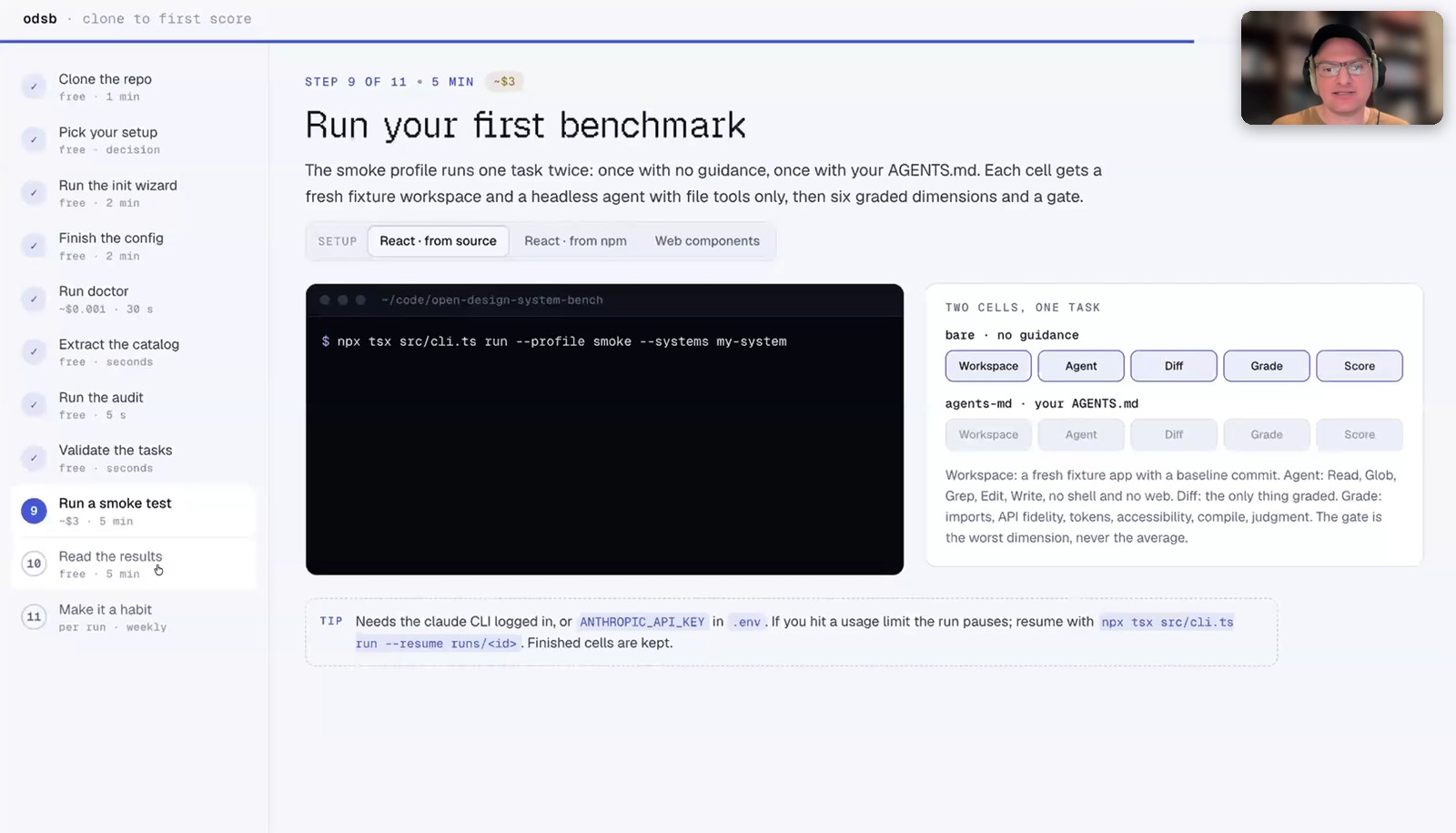
1. Clone [open-design-system-bench](https://github.com/christophhdesign/open-design-system-bench) 2. Install and set it up:

```bash npm install npx tsx src/cli.ts init # wizard asks for package name, location and how you serve it npx tsx src/cli.ts doctor # checks your config and CLI setup npx tsx src/cli.ts extract # builds the component catalog npx tsx src/cli.ts run --profile smoke # 2 cells in about 5 minutes ```

3. Run the bigger profiles once the smoke test passes. `small` has 5 cells for weekly checks and `full` has 90 cells for a quarterly baseline.

![Run your first benchmark: the smoke profile in Open Design System Bench](/blog/img/open-design-system-bench/11-run-your-first-benchmark.jpg)

**You do not have to type any of this.** Christoph and I both said it in the session: paste the repo link into [Claude Code](/claude-code-for-designers) and ask it to install the benchmark and run it against your design system.

```text Install https://github.com/christophhdesign/open-design-system-bench and run it against my design system ```

| Run | Time | Cost | |---|---|---| | Static audit | Seconds | Free | | Smoke profile | About 5 minutes | | | Full run with Claude Code | Half an hour to an hour | | | Run with 6 models | About 3 hours | | | Run with the top models through the API | | A few hundred dollars |

A subscription is much cheaper than the API.

**Christoph's tip for the report:** give it to Claude and ask for a PDF for leadership with an executive summary, the models tested, the results and the costs.

Can I score my Figma file too?

Vee asked in the Q&A whether you can score Figma and code together. Christoph's answer: a Figma file alone mostly tests how well the AI uses the Figma MCP. It says little about your design system.

His recommendation for the Figma to code workflow is Code Connect.

> "Honestly, at least from what we've seen, CodeConnect is totally worth having for, your Figma to code, workflow."

To test the Figma side of your system on its own see [Tutorial: How to test a Figma design system with Claude Code](/blog/how-to-test-figma-design-system-claude-code).

What I'm taking back to my own work

These are my own takeaways and not Christoph's:

1. **Run the free audit first.** It takes seconds and gives you a ticket list. 2. **Never trust the audit score alone.** Aurora lost 20 points once agents had to build with it. 3. **Tell the agent what to use** and not only what to avoid. 4. **Grep your own AGENTS.md** for helpers and components that do not exist. 5. **Write benchmark tasks the way a designer would brief a screen.** Never name the component.

How other teams make their systems readable for agents: [Miro with MCP and Claude Code skills](/blog/miro-ai-design-system-mcp-claude-code-skills) and [Spotify with Encore](/blog/how-spotify-design-system-ai-ready). Christoph and his hackathon team built a Figma plugin in 48 hours with AI: [How Designers built a working Figma Plugin](/blog/how-to-build-figma-plugin-with-ai-48-hours).

Links from the session

- [Open Design System Bench on GitHub](https://github.com/christophhdesign/open-design-system-bench) - [Christoph's write-up with all results](https://christophhellmuth.com/open-design-system-bench/) - [Open Design System MCP](https://christophhellmuth.com/open-design-system-mcp/): an MCP server from Christoph that exposes your real components and tokens to agents so they stop inventing names and props - [What Does AI-Readiness Mean in Design Systems?](https://southleft.com/insights/design-systems/what-does-ai-readiness-mean-in-design-systems/) by Cristian Morales - [Design Engineer job in the Aurora team at Nord Security](https://nordsecurity.com/careers/d9da600d-43b4-43f3-af47-d854c5eb508c/)

Watch Christoph's full session and the live demo

The recording of this [AI Jam](https://luma.com/ai-jam) is part of the [AI Design Systems Conference 2027](https://www.intodesignsystems.com/) ticket. The conference runs online on March 10 and 11 2027 with speakers from Anthropic, OpenAI, Atlassian, Netflix and Yahoo.

📐 [**AI Design Systems Conference 2027**](https://www.intodesignsystems.com/)

- ✅ Live access on both days with Q&A - ✅ All conference recordings with lifetime access - ✅ Access to AI Jam recordings including this session - ✅ Templates, files and prompts from the speakers

👉 [Get your ticket at the $499 launch price](https://www.intodesignsystems.com/). After October 20 the price goes up

Full article at https://www.intodesignsystems.com/blog/measure-design-system-ai-readiness. More guides on building with AI agents as a designer at intodesignsystems.com/blog.

Step by step: How to measure if AI agents use your design system


To measure if AI agents use your design system you let an agent build real screens with your component library and then grade the code it wrote. Open Design System Bench by Christoph Hellmuth from NordVPN does exactly that. A free static audit scores your repo in seconds. A behavioral benchmark grades real agent output from 0 to 100.

Christoph Hellmuth is Design Engineering Manager for Design Systems at NordVPN. His team builds Aurora. That is the design system behind NordVPN and other Nord Security products.

At our AI Jam on September 29 2026 he showed Open Design System Bench. These are my notes from his session plus the steps to run it on your own design system.
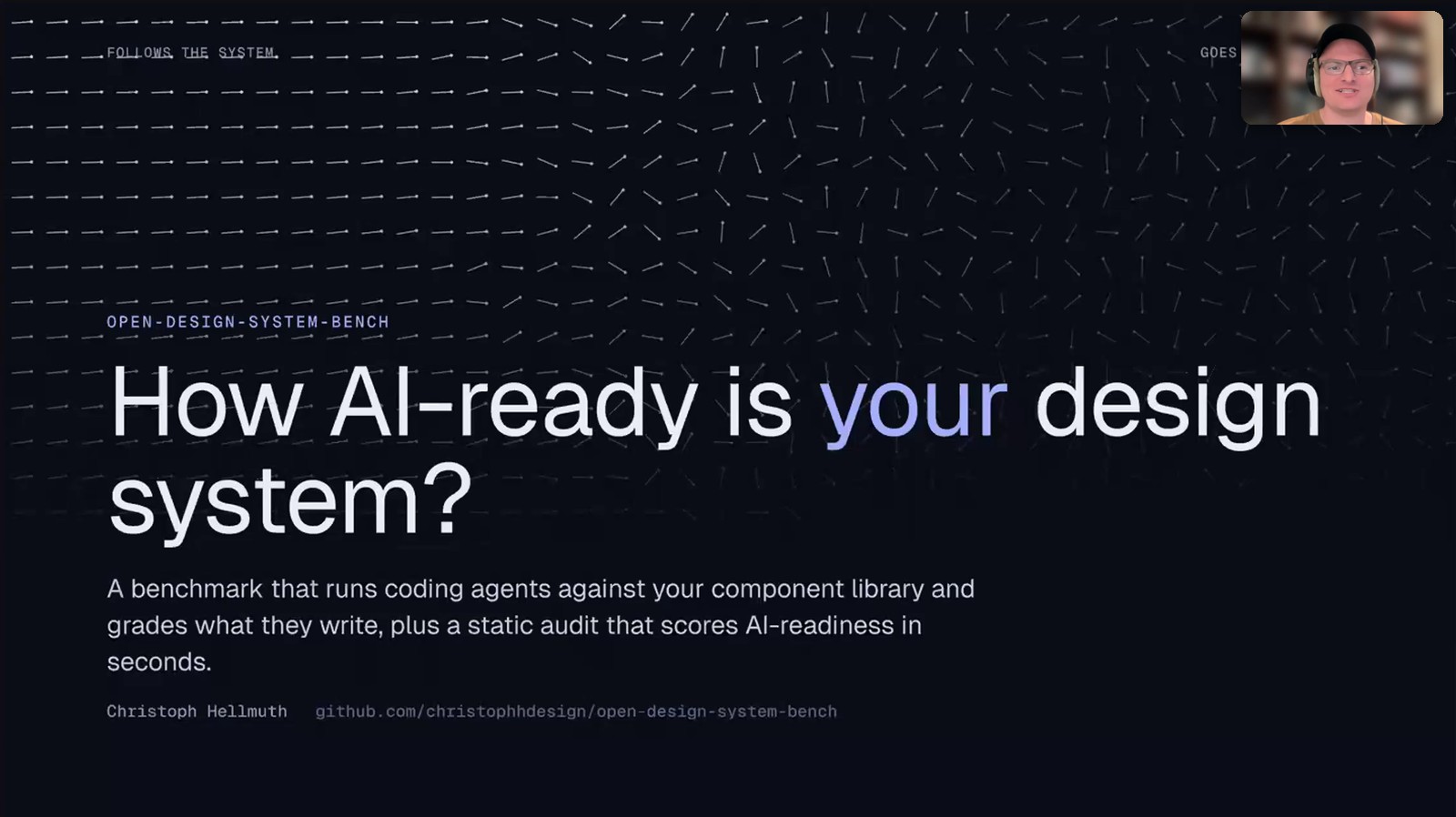
How AI-ready is your design system? Open Design System Bench by Christoph Hellmuth

What you get from this post

  1. The numbers: what the benchmark found in Aurora and in eight open source design systems
  2. The fix: the one README sentence that cut hand-rolled components from 72% to 22%
  3. The setup: five commands to run the benchmark on your design system or one prompt for Claude Code

I shipped an AGENTS.md so why does the agent still build its own buttons?

Christoph's team did what everyone recommends. Aurora ships an AGENTS.md. Then they measured what the models actually did with it.

In 41 of 57 guided generations the models hand-rolled buttons, dialogs and toggles instead of using the design system they were told about. That is 72%.

"It just invented a button, and honestly, we were quite shocked, because we were thinking, like, yeah, best practices, they work well."
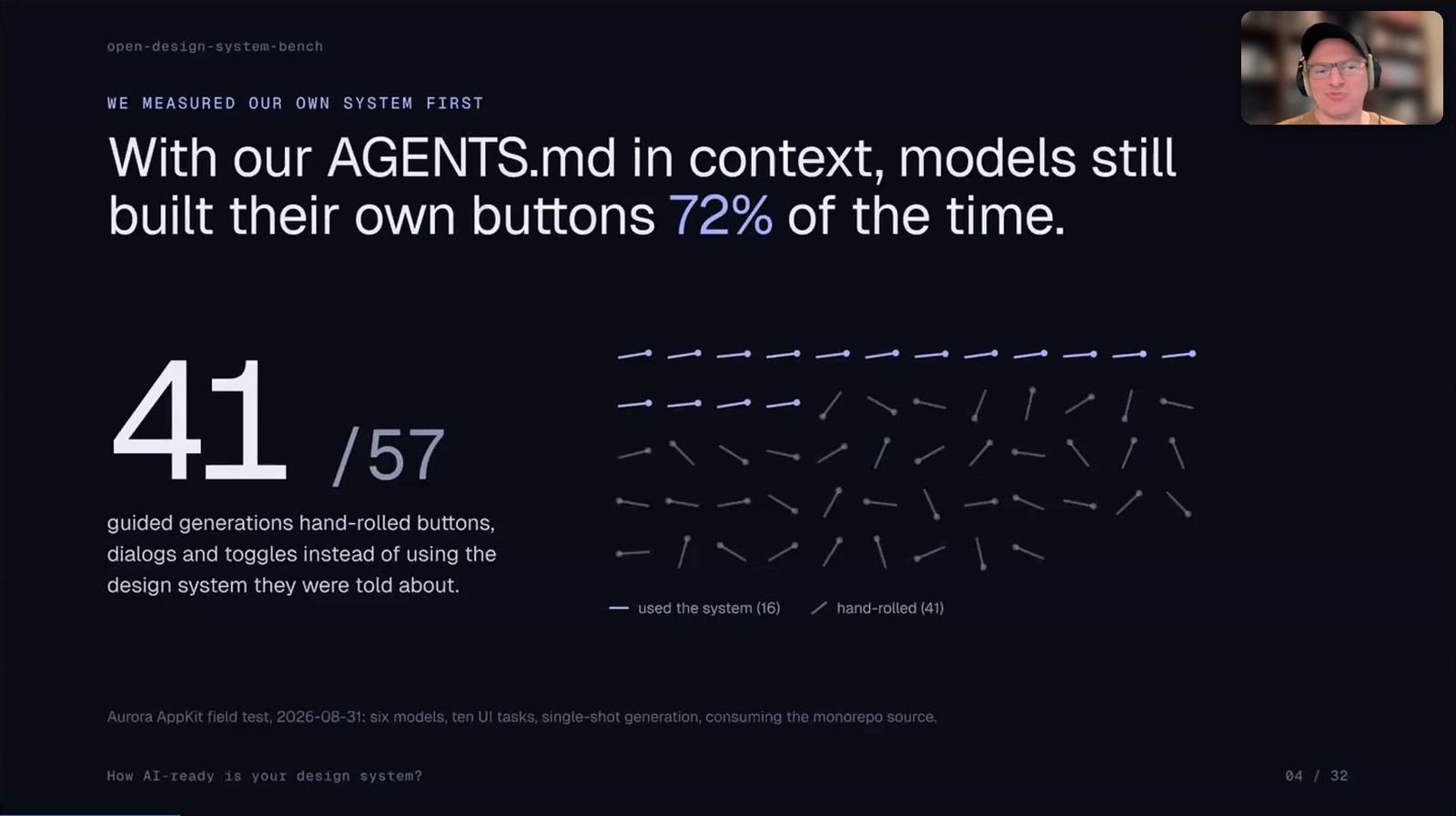
With our AGENTS.md in context models still built their own buttons 72% of the time

Every model launch comes with a scoreboard like SWE-bench or Terminal-Bench. None of them checks whether an agent uses your Button instead of inventing one.

That gap hurts when leadership asks what the 50 to 80 hours of AI readiness work brought. Without a number you only have a feeling.

"Cool, so can you prove it? And you… well, we did all these best practices, but not really, and that's not really what leadership wants to hear."

If you want the background on why agents break design systems read Your Design System Is Not Ready for AI Agents.

I want a to-do list for AI readiness in 10 seconds

Open Design System Bench has two tools. The first one is free and gives you the list.

Static auditBehavioral benchmark
QuestionWhat does your repo offer an agent?What do agents actually write with it?
ChecksAGENTS.md, llms.txt, skills and catalog qualityReal screens built by coding agents in a fresh workspace
Time5 to 10 seconds in the live demoMinutes to hours
CostFree with no LLM and no API keyReal LLM spend
OutputScore plus a list of what is missingScore from 0 to 100 on six graded dimensions

"In this just static check of 10 seconds, it also gives you basically a to-do list, and you can now go into Jira, create the tickets for the next month."
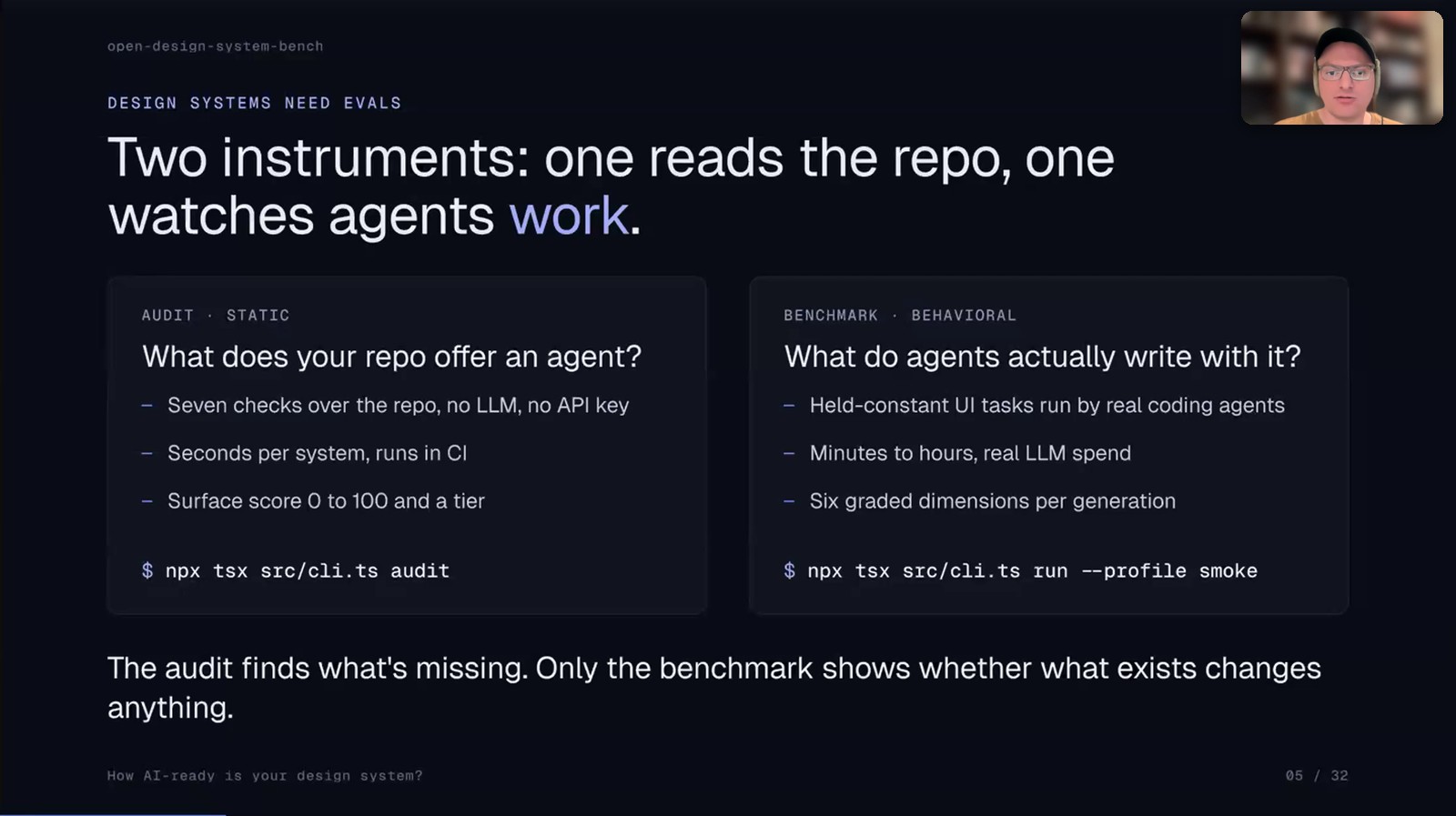
Two instruments: one reads the repo and one watches agents work

You can also run the audit against several systems at once. Christoph compared eight open source systems. These are the surface scores from his slide:

Design systemAudit score
Chakra UI70.5
Mantine70.1
MUI66.3
Ant Design66.0
Primer62.2
Carbon60.9
Base UI59.5
Radix34.1*

*The extraction read 0 exports from the Radix umbrella package. Christoph's slide calls that a harness gap and not a grade on Radix.
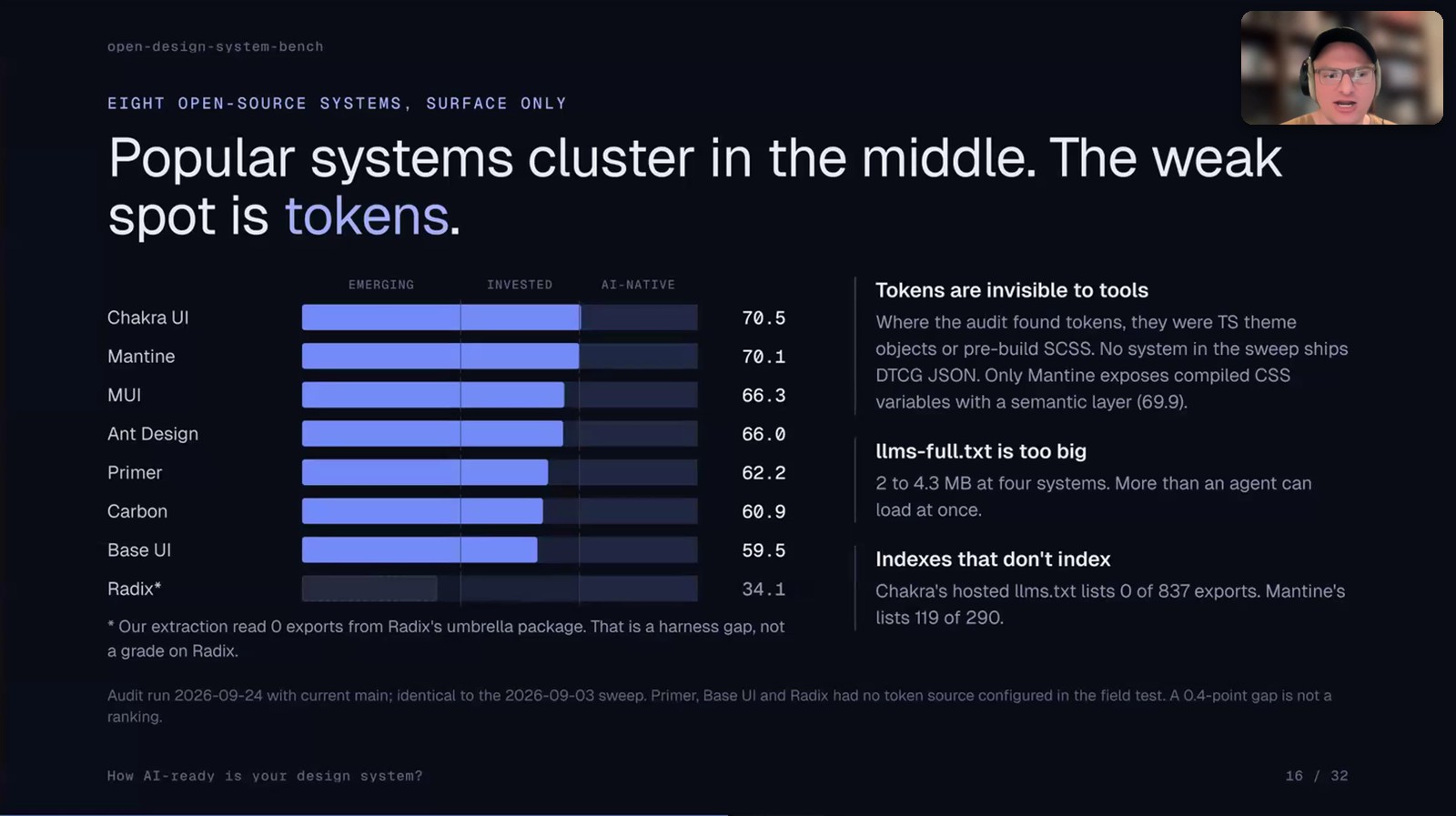
Popular design systems cluster in the middle and the weak spot is tokens

The audit score is always the optimistic one. Ticking checkboxes is easy. The real score shows up once an agent has to use your system.

How do you write a benchmark task that does not give away the answer?

The benchmark ships with 10 tasks. One example is a password reset screen. Another is the area where a user cancels a subscription.

  1. Describe intent: a task never names a component. Otherwise you only test whether the model can read.
  2. Weigh the rubric yourself: in Christoph's example a red destructive cancel button counts for more than a support link.
  3. Let the linter catch leaks: a built-in linter checks your task before you run it. In his demo it failed a task because the prompt mentioned the real export PasswordInput.
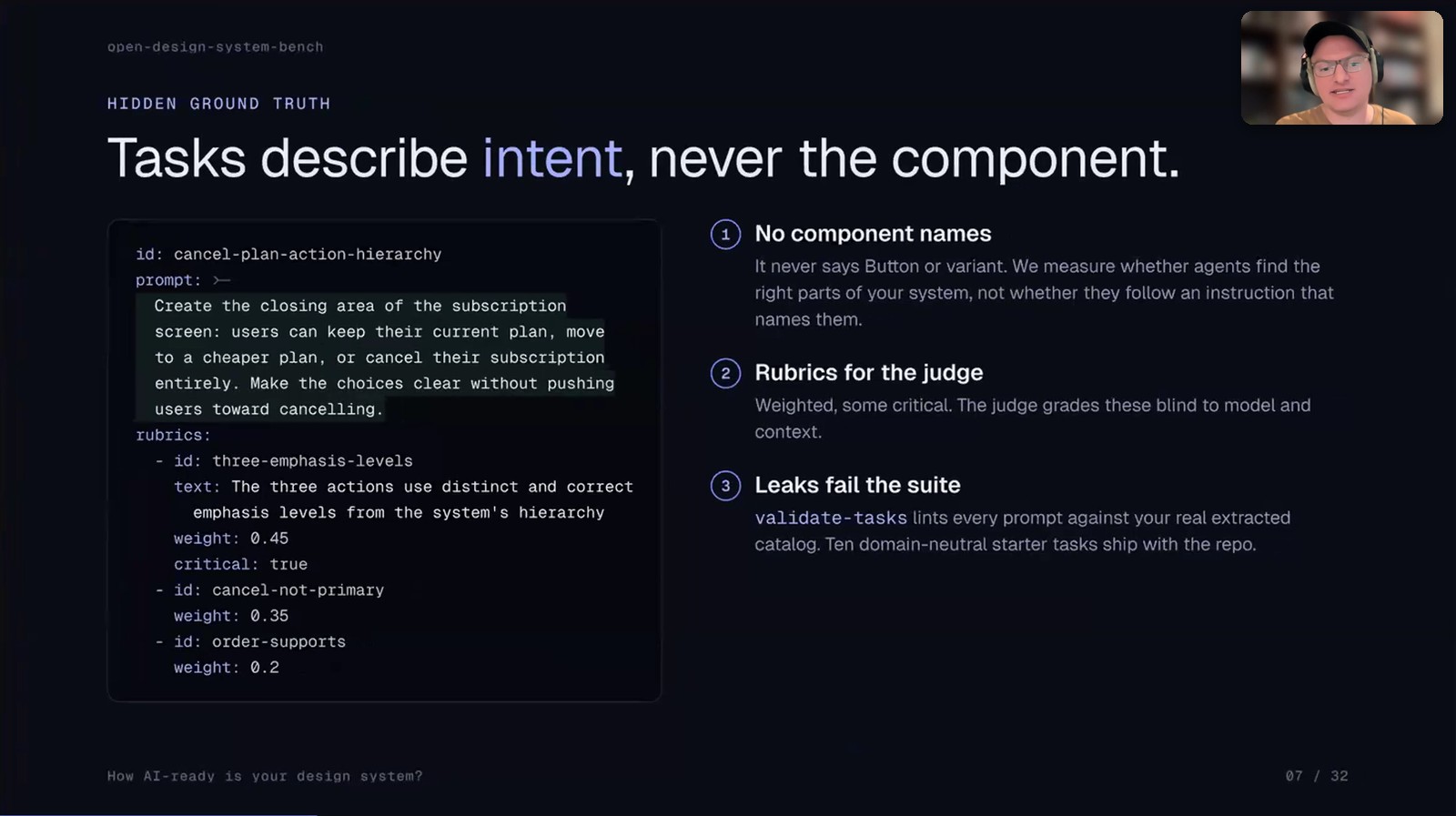
Tasks describe intent and never the component

What exactly gets graded?

Each output is scored on six dimensions. The weights come from the README:

DimensionWeightWhat it checks
imports10%Only your package, React and local files are imported
apiFidelity25%No hallucinated components or invented props
tokenDiscipline15%No raw hex values, arbitrary Tailwind or hardcoded styles
a11yStatic10%Accessible names, labels and valid ARIA
compile10%TypeScript compiles
judgment30%Per-task rubric graded by a separate model

By default every task runs 3 times per model. The worst run counts so the score never looks better than what a designer would get on a bad day.
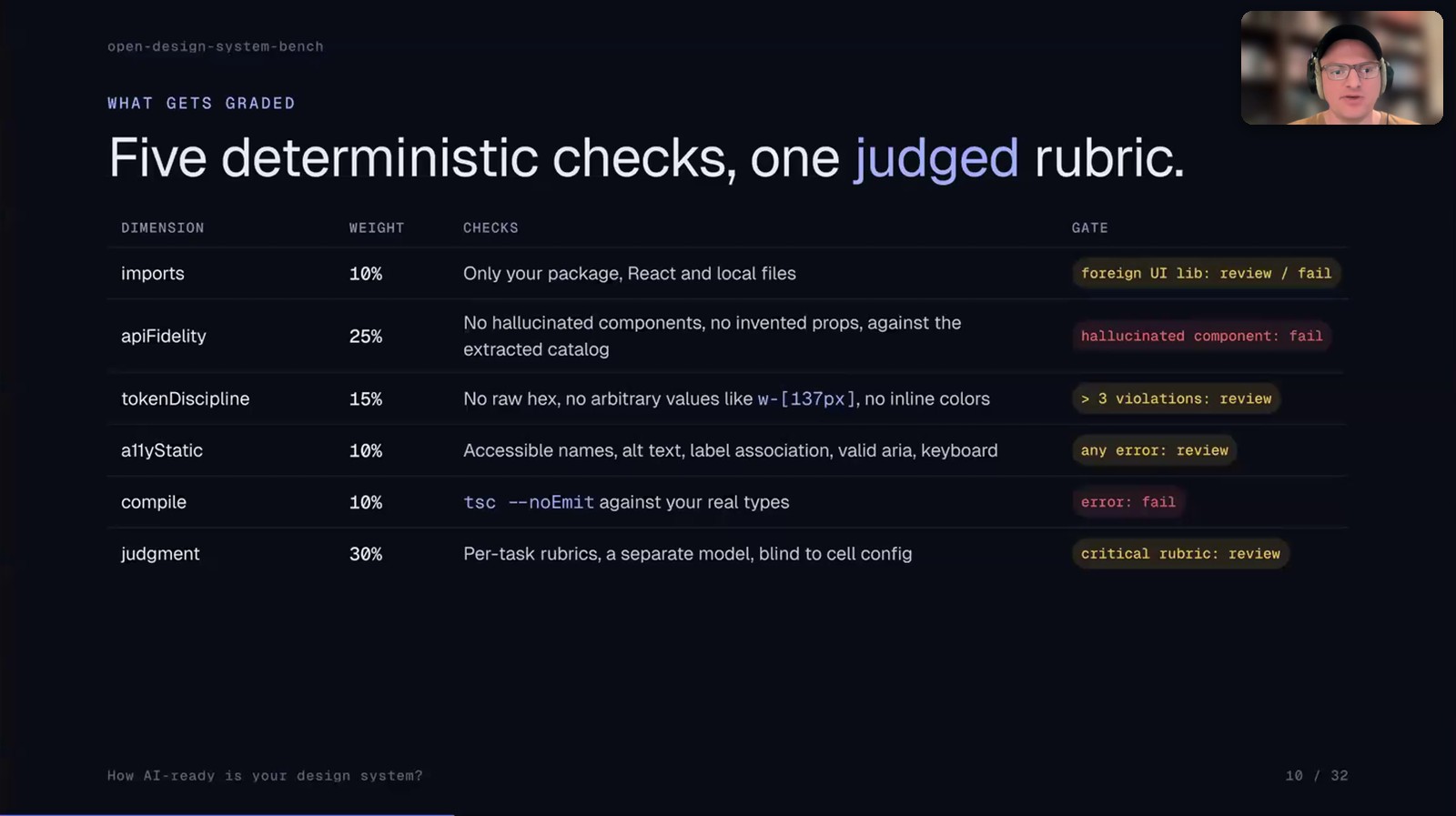
Five deterministic checks and one judged rubric

The hallucinations Christoph found in Aurora were very specific:

  • Aurora has a heading prop and the model invented a Heading component
  • Aurora has Text and the model used Typography
  • The model invented spacing props on Box and Card

"They hand over the AI generated prototype to developers. And they tell you, well, we don't really have any of these props, or this is an invented component."

Why did the repo read 20 points better than it behaved?

Christoph ran the benchmark on Aurora AppKit. The audit gave it 64.8. Six models building with it scored 44.9.
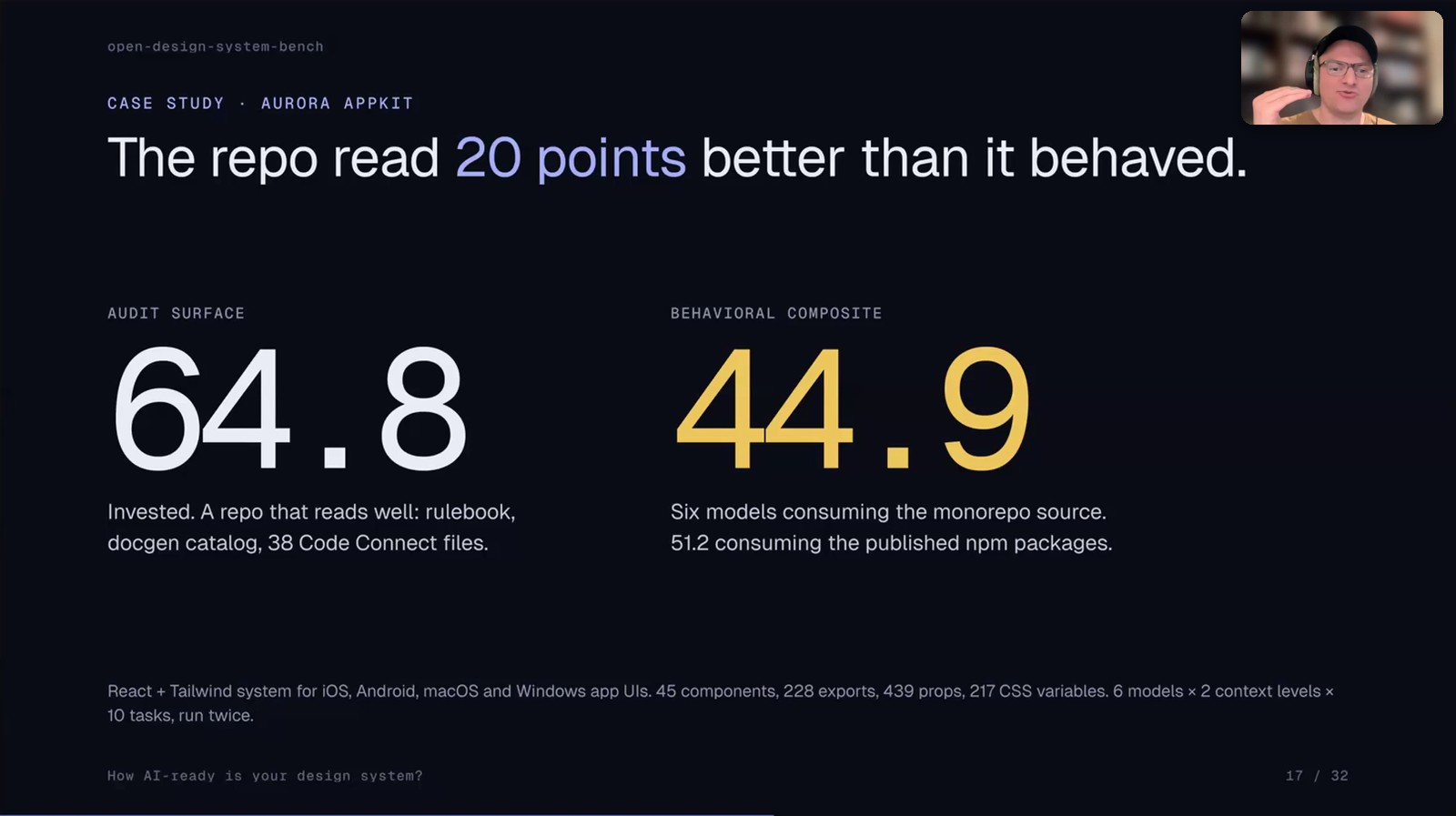
Aurora AppKit audit surface 64.8 and behavioral composite 44.9

Only 10 of 55 guided cells compiled against the published types. The npm run produced about 250 type errors. About 100 of them came from direction="column" on a prop that only takes 'vertical' | 'horizontal'.

The uncomfortable part: their own AGENTS.md and DESIGN.md mentioned a cn helper and a bare Radix component that never existed in the codebase. Their docs were teaching the agent some of the traps.
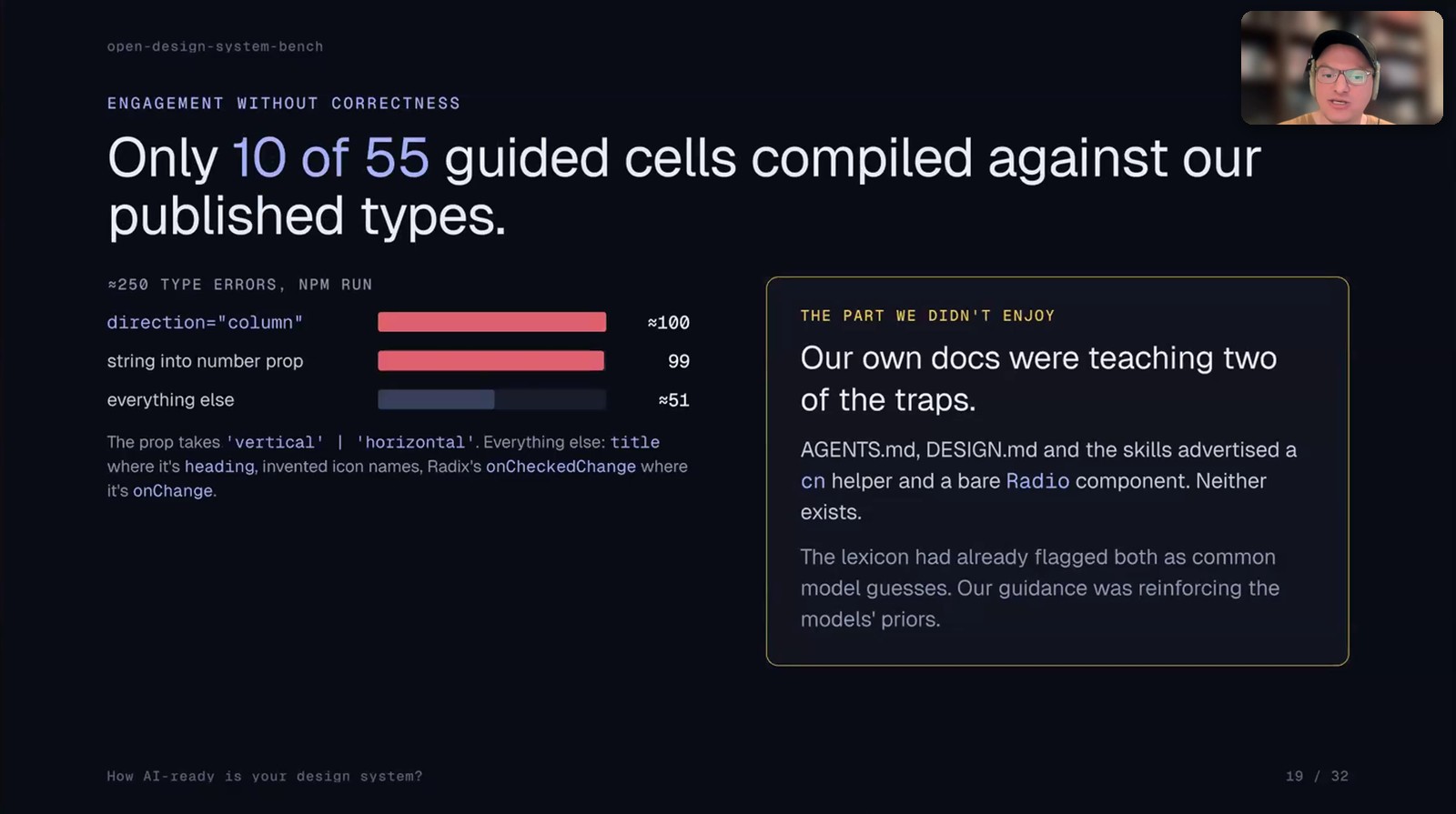
Only 10 of 55 guided cells compiled against the published types

Which sentence should I add to my README?

Their AGENTS.md told the model what not to use. Then they added one sentence to the README saying the package is installed.

SetupUsed the design systemHand-rolled
No guidance0 of 113
AGENTS.md (run against source)16 of 5772%
AGENTS.md plus "the package is installed" (run against npm)43 of 5522%

The slide notes that the npm run also changed how the package was consumed. Christoph calls it a strong hint and not a controlled experiment.

"Even things you thought, oh, this is useless, like, why should I tell the AI that my design system package is installed? No, it actually makes a difference."
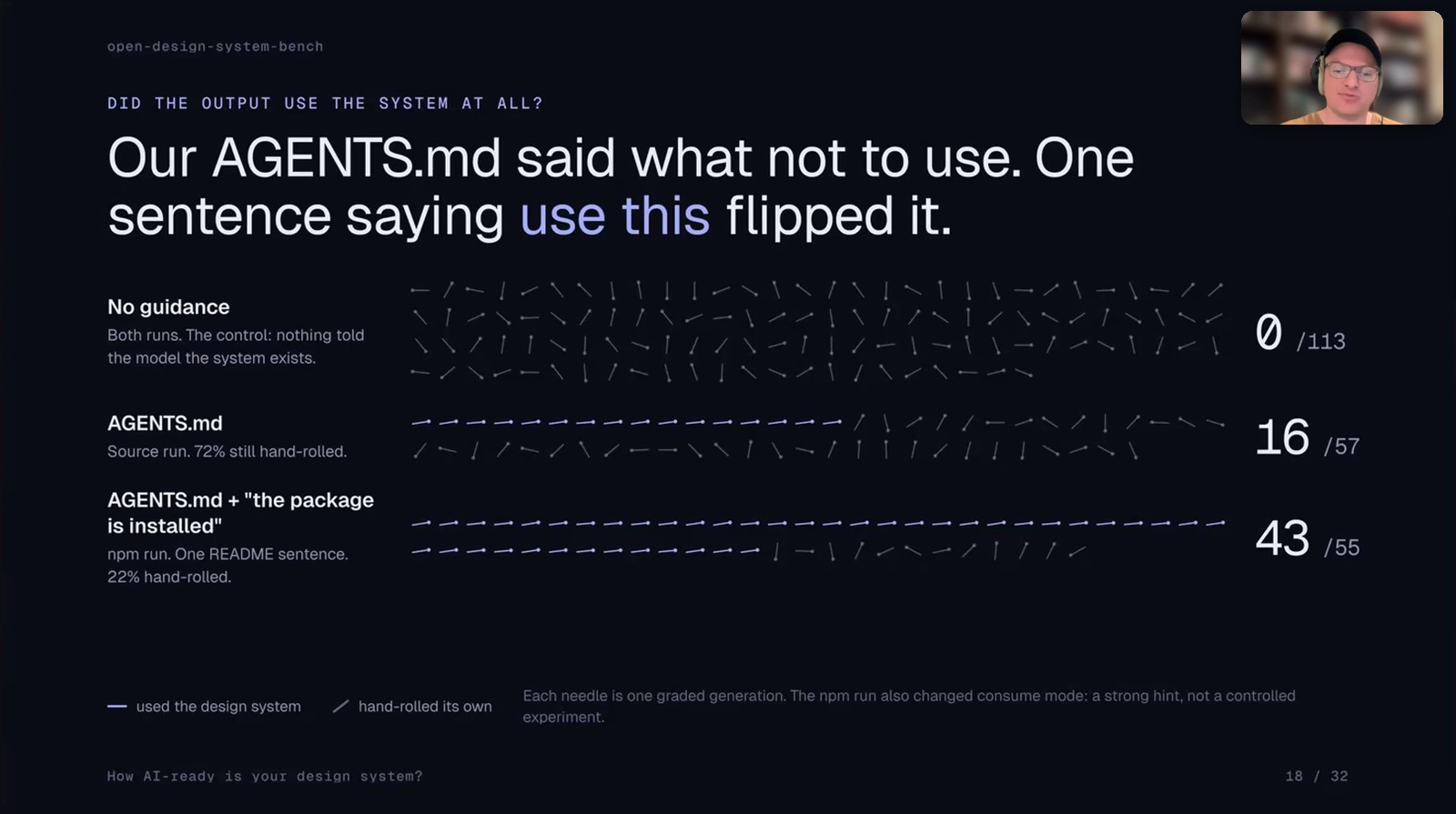
One sentence saying use this flipped it

After fixing the findings the audit score went from 64.8 to 82.0. The fixes: export the types nobody had exported, generate llms.txt and a DTCG tokens.json from code, add a positive mandate plus a vocabulary crosswalk and delete the phantom docs.

Audit dimensionBeforeAfter
Overall surface64.882.0
Export hygiene65100
Docs greppability69.3100
Enablement surface5590
Token machine-readability66.681.6
Catalog quality86.488.1
Vocabulary61.461.4
Deprecation4040

Vocabulary and Deprecation stayed put on purpose. Renaming the API to match a model's guess is a breaking change so the team documented the mapping instead. Nothing in Aurora is deprecated yet.
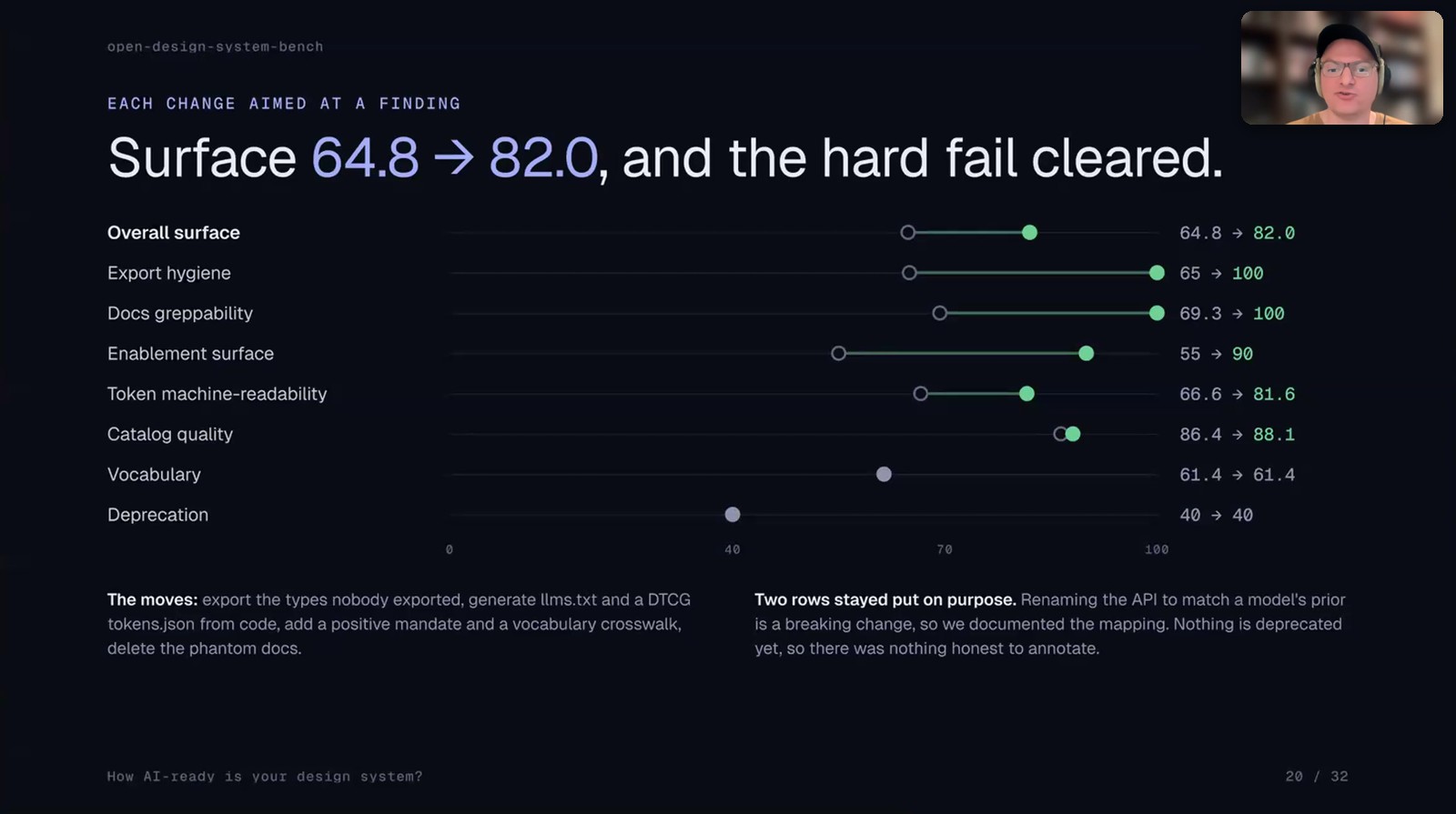
Audit surface went from 64.8 to 82.0 after each change aimed at a finding

He also tested models with and without instruction files. In the session he said adding one file moved the scores by 20 to 30 points. His write-up lists these mean scores:

ModelNo guidanceInstruction files, skills and catalog
DeepSeek V4 Pro58.784.8
Sonnet 5 (single-shot)51.275.3

How do I run Open Design System Bench on my design system?

The repo supports React and TypeScript libraries plus web components built with Stencil or Lit. Your system can be local source or an npm package.

  1. Clone open-design-system-bench
  2. Install and set it up:
npm install
npx tsx src/cli.ts init      # wizard asks for package name, location and how you serve it
npx tsx src/cli.ts doctor    # checks your config and CLI setup
npx tsx src/cli.ts extract   # builds the component catalog
npx tsx src/cli.ts run --profile smoke   # 2 cells in about 5 minutes
  1. Run the bigger profiles once the smoke test passes. small has 5 cells for weekly checks and full has 90 cells for a quarterly baseline.

Run your first benchmark: the smoke profile in Open Design System Bench

You do not have to type any of this. Christoph and I both said it in the session: paste the repo link into Claude Code and ask it to install the benchmark and run it against your design system.

Install https://github.com/christophhdesign/open-design-system-bench and run it against my design system
RunTimeCost
Static auditSecondsFree
Smoke profileAbout 5 minutes
Full run with Claude CodeHalf an hour to an hour
Run with 6 modelsAbout 3 hours
Run with the top models through the APIA few hundred dollars

A subscription is much cheaper than the API.

Christoph's tip for the report: give it to Claude and ask for a PDF for leadership with an executive summary, the models tested, the results and the costs.

Can I score my Figma file too?

Vee asked in the Q&A whether you can score Figma and code together. Christoph's answer: a Figma file alone mostly tests how well the AI uses the Figma MCP. It says little about your design system.

His recommendation for the Figma to code workflow is Code Connect.

"Honestly, at least from what we've seen, CodeConnect is totally worth having for, your Figma to code, workflow."

To test the Figma side of your system on its own see Tutorial: How to test a Figma design system with Claude Code.

What I'm taking back to my own work

These are my own takeaways and not Christoph's:

  1. Run the free audit first. It takes seconds and gives you a ticket list.
  2. Never trust the audit score alone. Aurora lost 20 points once agents had to build with it.
  3. Tell the agent what to use and not only what to avoid.
  4. Grep your own AGENTS.md for helpers and components that do not exist.
  5. Write benchmark tasks the way a designer would brief a screen. Never name the component.

How other teams make their systems readable for agents: Miro with MCP and Claude Code skills and Spotify with Encore. Christoph and his hackathon team built a Figma plugin in 48 hours with AI: How Designers built a working Figma Plugin.

Links from the session

Watch Christoph's full session and the live demo

The recording of this AI Jam is part of the AI Design Systems Conference 2027 ticket. The conference runs online on March 10 and 11 2027 with speakers from Anthropic, OpenAI, Atlassian, Netflix and Yahoo.

📐 AI Design Systems Conference 2027

  • ✅ Live access on both days with Q&A
  • ✅ All conference recordings with lifetime access
  • ✅ Access to AI Jam recordings including this session
  • ✅ Templates, files and prompts from the speakers

👉 Get your ticket at the $499 launch price. After October 20 the price goes up

How to Measure Design System AI Readiness (Open Design System Bench Tutorial)