
To search Design System jobs with an AI agent you connect the Into Design Systems job board to Claude Code over MCP with one command. The agent then reads all 225 open roles instead of the four you opened in tabs and it judges each one by the requirements the company wrote rather than by the title the company picked.
Setup is two minutes. Every figure below is what the board itself answered on 21 August 2026.
First: what the Into Design Systems job board is
In case you have not come across it yet. We run a job board at jobs.intodesignsystems.com that carries open Design System and AI design roles and nothing else. On 21 August 2026 that was 225 roles from 190 companies. No account and no paywall. Every posting is checked by hand and a role that closes is removed so what you see is still open.
One thing on it works differently from a general job board. Each posting carries its AI and agentic requirement lines as their own list pulled out of the text the company wrote. That is the part deciding most of these hires now and it is the part a job title never tells you.
Since this week the board also has an MCP server. That is what the rest of this tutorial is about: instead of scrolling the board yourself you point an AI agent at it and it reads all 225 postings for you.
Connect the job board to Claude Code in two minutes
1. Paste this into Claude Code
claude mcp add -s user --transport http ids-jobs https://jobs.intodesignsystems.com/mcp
-s user registers the server for every folder on your machine. Without that flag it only exists in the folder you were standing in when you ran the command.
2. Restart Claude Code
Tools load when a session starts so quit with /exit and start it again. Then ask "which tools do you have from ids-jobs?" and you should get five back.
Working without a terminal? Claude Desktop and claude.ai take the same URL under Settings then Connectors then Add custom connector. Cursor and every other MCP client work too and the setup page carries the config for each.
3. Put your CV in the folder as cv.md
Plain text is enough. One thing matters more than the formatting: name your tools out loud. The agent treats a skill you did not write down as a gap. Design systems and Figma and tokens on your CV say nothing about whether you can work with AI so if you have shipped anything with Claude Code or Cursor or an MCP server or a token pipeline then write those words down. Half the postings on this board turn on exactly that.
No CV file? Describe your skills in the chat instead. It works the same way.
Your first prompt
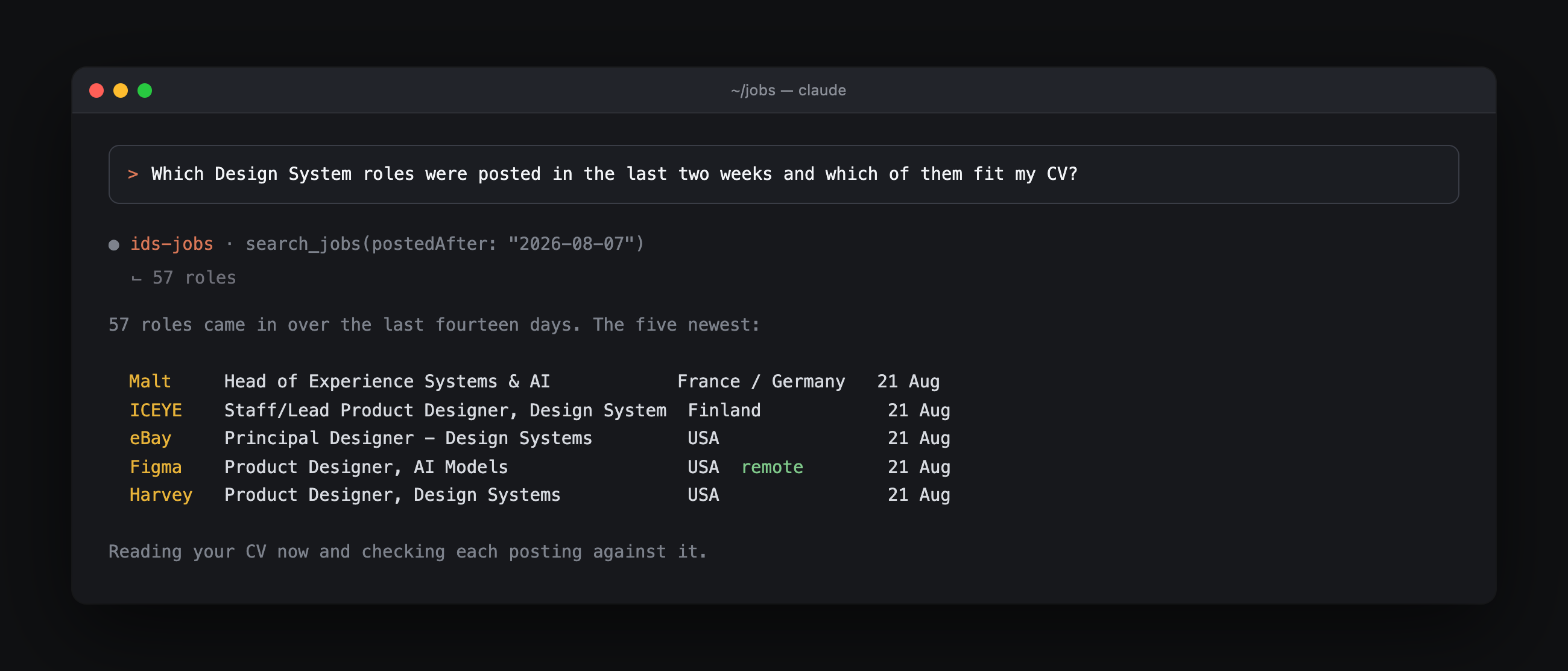
57 roles came in over that window. The five freshest looked like this:
Malt      Head of Experience Systems & AI              France / Germany   21 Aug
ICEYE     Staff/Lead Product Designer, Design System   Finland            21 Aug
eBay      Principal Designer - Design Systems          USA                21 Aug
Figma     Product Designer, AI Models                  USA remote         21 Aug
Harvey    Product Designer, Design Systems             USA                21 Aug
What comes back is not a list of titles. It is a verdict per role plus the requirement you are missing. That is the whole point: you stop reading postings and start reading answers.
What the Design System job market looks like right now
| 21 August 2026 | |
|---|---|
| Open Design System roles | 225 |
| Companies hiring | 190 |
| Companies with two or more roles | 27 |
| Posted in the last 14 days | 57 |
| Remote roles that name AI or agentic skills | 32 |
| Postings that state a salary range | 46 |
| Contract instead of permanent | 7 |
Nobody reads 225 postings. You read four and apply to two. That gap is the reason this exists.
How to filter 225 postings down to a shortlist
32 roles clear both bars at once. Start there if you want a job that is both location free and pointed at where the craft is going.
Two postings held against each other with your CV as the ruler.
Twelve open tabs become one file you can reopen tomorrow. Ask it to strike a row once you have applied.
Because closed postings leave the board this is a genuine status check. Run it before you spend a Sunday on a role that filled two weeks ago.
How to find out what a Design System role pays
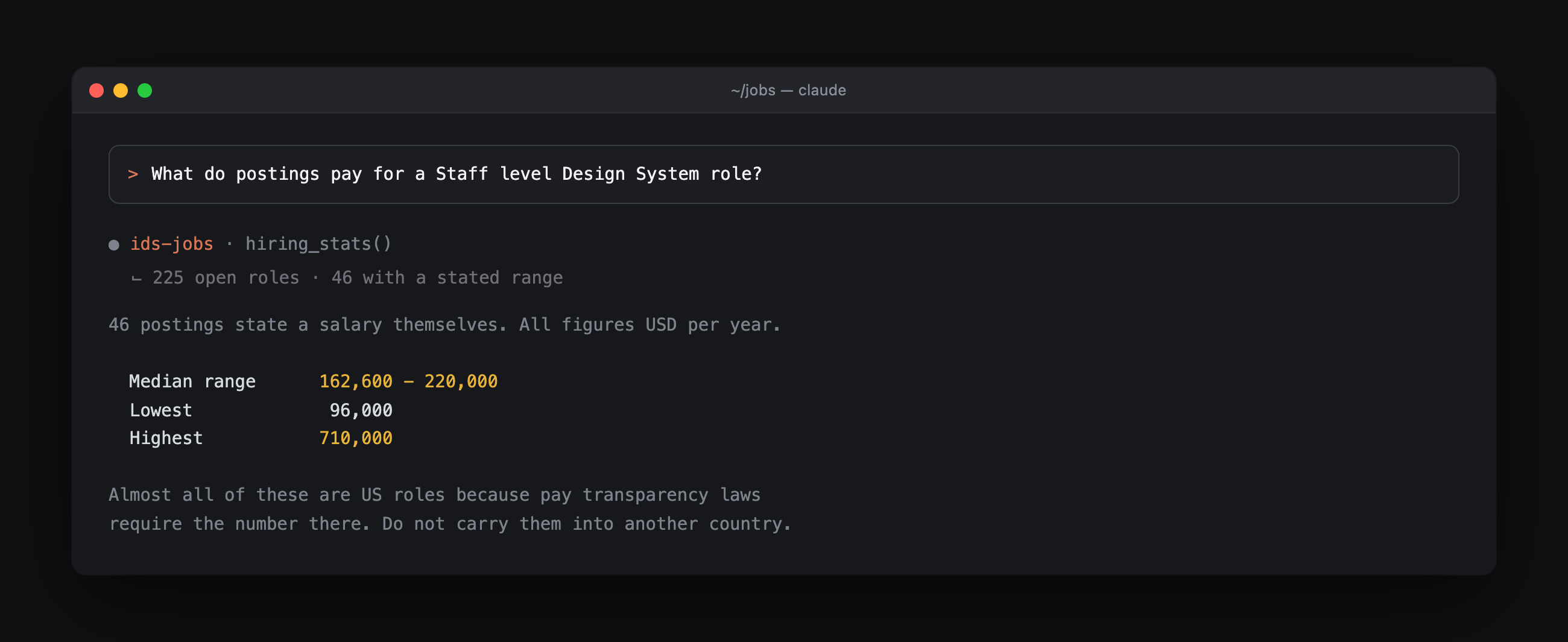
46 companies published a range. The median sits between 162,600 and 220,000 USD and the top of the board reaches 710,000. Nearly all of them are US roles because pay transparency laws force the number there. Do not carry a US band into a European negotiation.
17 US postings name design tokens. Eleven of those state a range and four clear 200,000 USD at the top. The highest is Netflix for Systems Designer in Design Foundations at 260,000 to 400,000.
You get a band built from postings that did publish one plus the level and country each came from. Treat it as a reference point and not as their budget. Name your number first either way.
How to find the skills your CV is missing
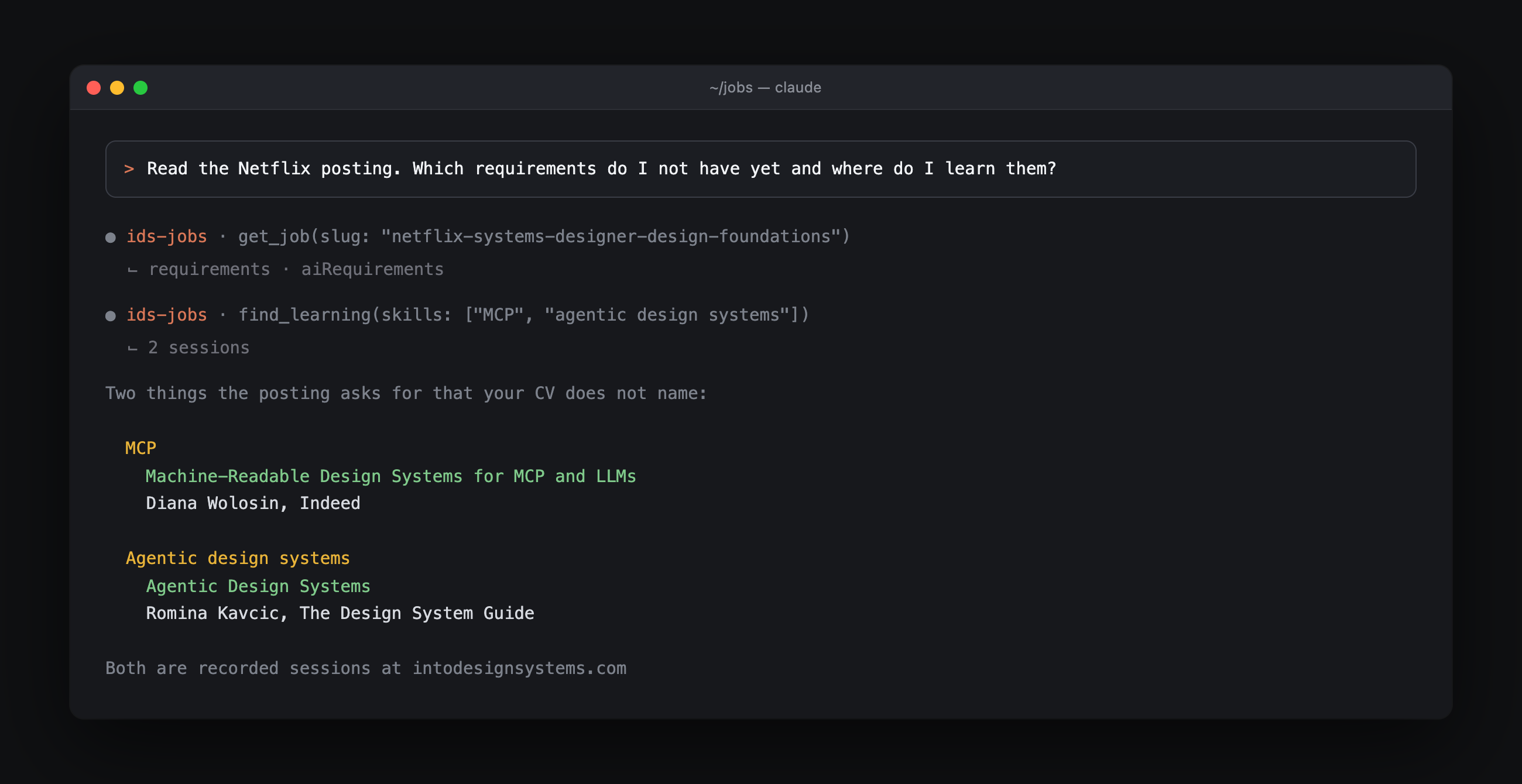
Of the 135 postings the board holds the full text for 93 ask for AI or agentic skills. This is the prompt for the months when you are not applying: it replaces guessing about the market with reading it. Our piece on the AI design system skills to learn in 2026 argues the same case from the hiring side.
Naming a gap is the easy half. find_learning takes the missing skill and points at the recorded Into Design Systems AI Conference session that teaches it. MCP returns Diana Wolosin of Netflix on machine-readable design systems for MCP and LLMs. Agentic design systems returns Romina Kavcic on the five agentic flows.
48 of the described postings ask for none. Worth knowing if you are still building that muscle and want something you can start on Monday.
Vocabulary research and nothing more. You still write the CV yourself. You write it in the language the market is searching in.
How to prepare for the interview from their own posting
Their own priorities in their own words plus the questions worth rehearsing.
Saves you three evenings of prep on a topic that will never come up.
A question pulled from their requirement list sounds different from the three questions every candidate asks.
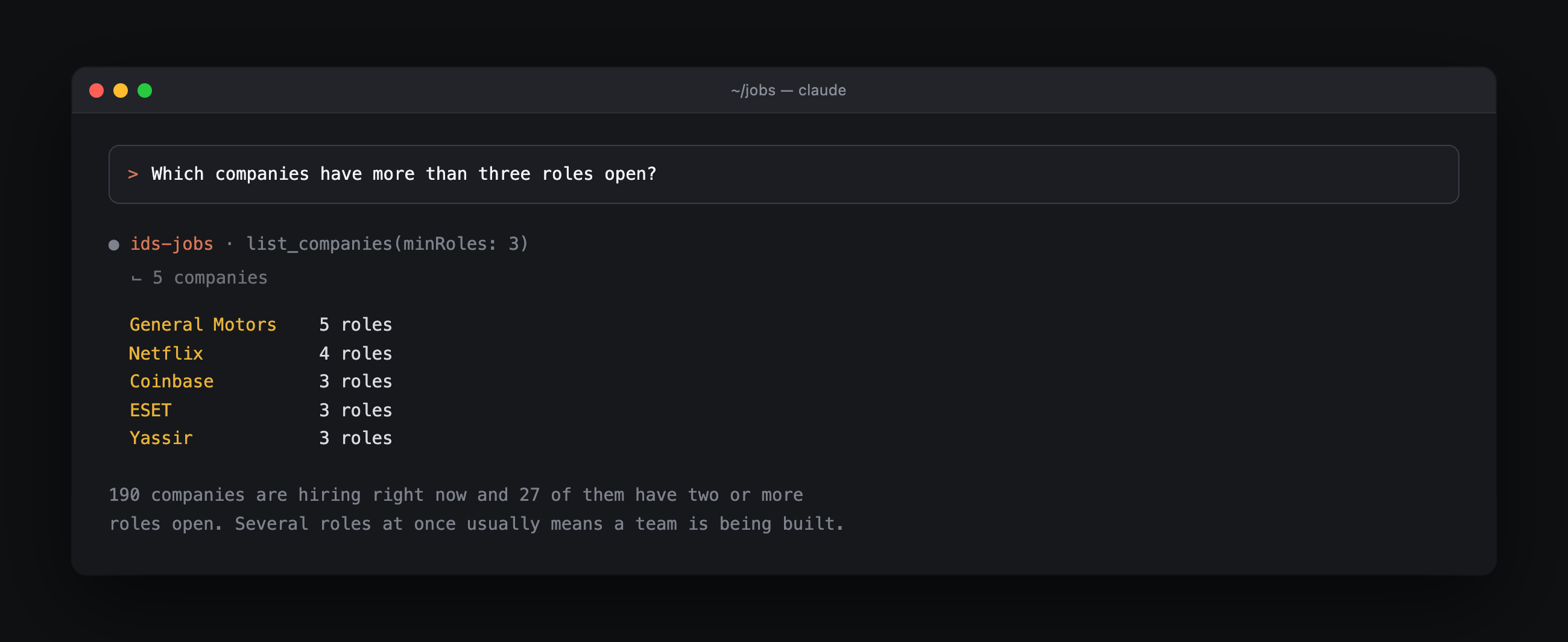
General Motors has 5 open and Netflix has 4. Coinbase and ESET and Yassir sit at 3 each. Several roles at once usually means a team is being staffed rather than a seat being backfilled. That is a reason to message someone directly.
Where Design System jobs are right now
The USA holds 119 and the United Kingdom 16 and Germany 14. Canada and France have 12 apiece.
One of the 14. Numbers like that are worth checking before you spend a year applying into a country you have no plan to move to.
190 companies with 27 of them running two or more searches at the same time.
Seven at the moment. The employment type comes back with the posting so you can separate permanent from contract before you read a single one.
How hiring managers can use the same data
You get the requirement lines your competitors publish and yours never mentions.
88 open postings carry Design System Designer in the title and 94 carry Product Designer and 23 carry Design System Engineer. 98 sit at Staff or Senior. Title the role the way the people you want are typing it into a search box.
Every company hiring in your corner of the board and how many seats each is filling. That is the other tab your candidate has open.
How to set up a daily job alert with a cron job
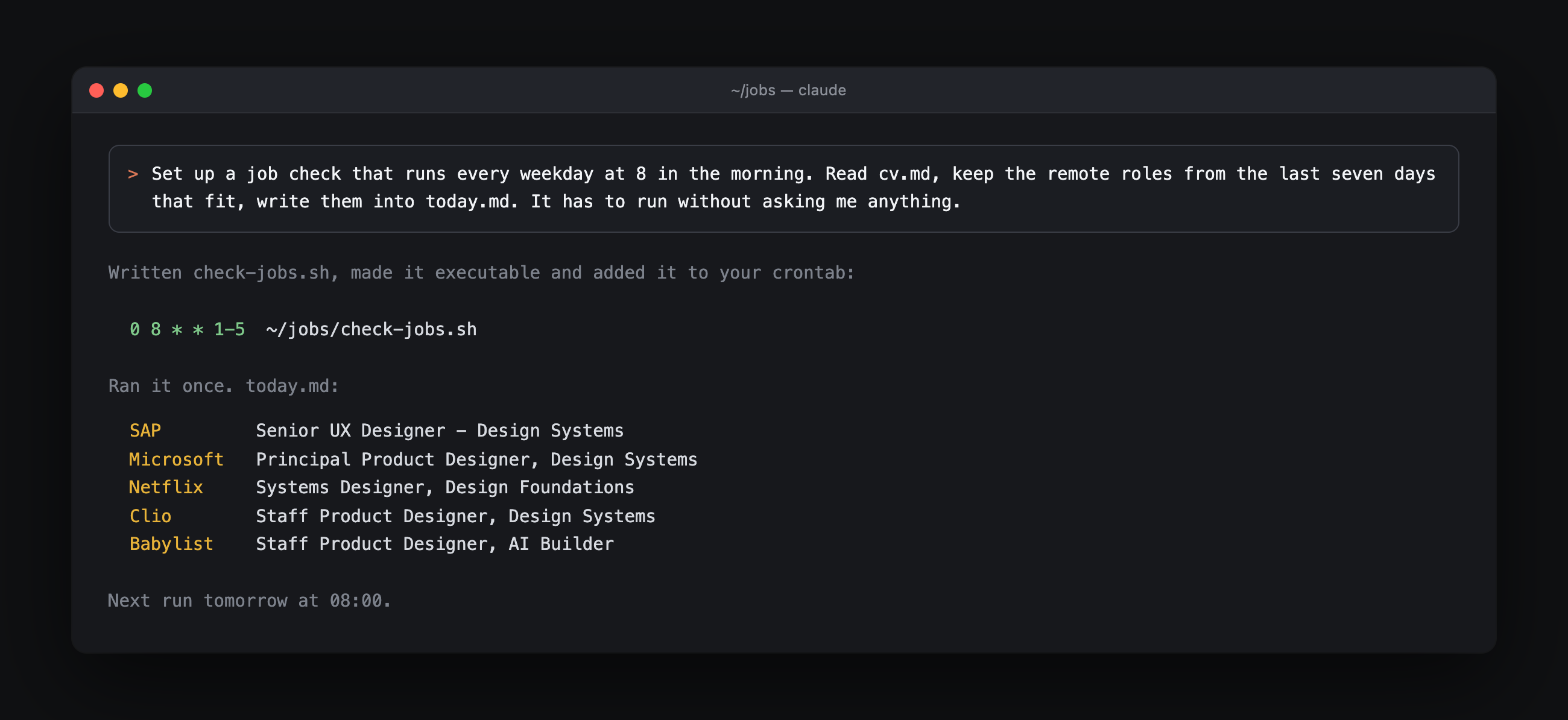
A cron job is your Mac running something on a schedule while you are not there. You do not have to write one or learn the syntax. You describe the job and Claude Code writes it.
24. The daily check
Start Claude Code in the folder that holds your cv.md and paste this:
Set up a job check that runs every weekday at 8 in the morning. Read cv.md in
this folder. Ask the ids-jobs server for the roles posted in the last seven days
that can be done remotely and keep the ones that fit my CV. Write them into
today.md with one line per role: company and title and why it fits. If nothing
fits write nothing new. It has to run on its own without asking me anything
because I am not at the machine at 8. Put it in my crontab and run it once now
so I can see that it works.
It writes the script and installs the schedule and shows you the first run. Mine produced this:
SAP        Senior UX Designer - Design Systems
Microsoft  Principal Product Designer, Design Systems
Netflix    Systems Designer, Design Foundations
Clio       Staff Product Designer, Design Systems
Babylist   Staff Product Designer, AI Builder
Two things worth knowing before you run it:
- One confirmation from you: Claude asks permission before it touches your crontab. Approve it once and the schedule is live.
- Full Disk Access: grant it to your terminal under System Settings then Privacy and Security on macOS. Without it the 8 o'clock run cannot open your CV.
The daily version belongs to an active search. This one is what you keep running in the quiet months. It costs two minutes on a Monday.
For the handful of companies you would actually leave for. On most days it writes nothing and that is the feature.
Four months in you own a trend line nobody else has. The board shows you today. The file shows you the direction.
One extra sentence on any prompt above and the result arrives in your inbox.
You never open crontab yourself. You say what should change and Claude edits it.
Troubleshooting
| What you see | What is going on |
|---|---|
| Claude says it has no ids-jobs tools | Tools load when a session starts. Quit with /exit and start again |
| Still no tools after a restart | You ran the command without -s user so the server only exists in that one folder. Run it again with the flag |
| It answers about roles that are not Design System roles | Nothing else is on the board. Ask it to name the posting behind every line and the invented ones disappear |
| It quotes a salary the posting does not state | Ask which posting the number came from. The board reports a missing range as not stated and a number you were not given is not one to take into a negotiation |
| It matched on job titles and not on what you can do | Tell it to read the full posting and work through the AI requirement lines one by one. Titles are the least reliable field on any board |
| The 8 o'clock run wrote nothing | Either nothing new matched which is how you asked it to behave or your terminal is missing Full Disk Access |
Under the hood
Skip this if the prompts are all you wanted. It is here for the day you wonder what is actually happening.
What MCP is. The standard that lets an AI agent call a tool instead of scraping a web page. A browser hands an agent a page and it has to guess which part is the salary and which part is the requirement list. MCP hands it the posting as data. Nothing is inferred and nothing is scraped.
| Job board in a browser | Job board over MCP | |
|---|---|---|
| Postings you read | The four tabs you opened | All 225 |
| What the agent sees | Rendered HTML it has to interpret | Company and country and remote status and employment type and requirement lines and salary range as fields |
| Matching against your CV | You read and judge each one | Requirement by requirement across the whole board |
| Salary research | Open each posting and note the range | One question against the 46 postings that publish one |
| Keeping up | You go back and scroll again | A cron job checks it while you sleep |
The five tools. You never call these by name. Knowing what each one holds is what lets you ask for the right thing.
| Tool | What it answers |
|---|---|
search_jobs | Which roles match a title or country or remote status or AI requirement |
get_job | What one posting says in full including its AI requirement lines and employment type |
hiring_stats | What the market looks like as a whole: countries and salary bands and AI share |
list_companies | Who is hiring and how many roles each of them has open |
find_learning | Where to learn a skill a posting asks for and your CV does not name |
If MCP is new to you our Figma MCP server explainer covers the same idea from the design tooling side.
What it does not do
- It does not apply for you: every role links out to the employer's own page and the server sends nothing on your behalf.
- It should not write your cover letter: a letter that came out of a model reads like one. Use the agent to understand the role and then write the letter in your own words.
- It only knows Design System and AI design roles: nothing outside that scope is on the board.
Try it
claude mcp add -s user --transport http ids-jobs https://jobs.intodesignsystems.com/mcp
Config for every client sits on the setup page and the board itself is at jobs.intodesignsystems.com.
Missing the AI skills that 93 of these postings ask for? The AI Conference recordings cover MCP and Claude Code and Cursor and design system automation from the teams running them in production.


